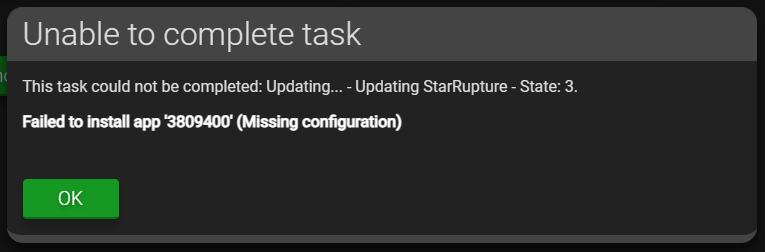
It seems, it doesn’t help.
Tried:
- Hit “Upgrade this instance” just below the “Currently running version 2.6.4.2 - 20251210.2” in “Main Menu → Support and Updates”. Machine is restarting. Result is the same Error Message as before.
- Hit “Upgrade this instance” just below the “Currently running version 2.6.4.2 - 20251210.2” in the Instance “Support and Updates” Menu. I automaticly exit the Instance in the Main Menu. Took a while for the instance to switch from “Idle” to “Update” and then “Starting”. Result is the same Error Message as before.
- Just restarted three times AMP in “Main Menu → Support and Updates” an the bottom of the Menu. Every time i get the “Website is not available” from my browser. First time, the can’t be a restart, because one other (running Enshrouded) instance was at “17 Minutes running” what shouldn’t be right after a restart. Second time, the Enshrouded instance was restartet, but the log in the StarRupture instance had no update in log. Just hanging on “Error”, the log was ~5 Minutes old. Third time the exact same behaviour as the second restart.
- Stopping all instances and reboot the proxmox VM completely new. The Enshrouded instance came back just normal. The StarRupture instance hat some fresh (but same) Error Messages (“Error! App ‘3809400’ state is 0x202 after update job.”)
- In the Console for the StarRupture App hitting the orange “Update instance” Button on top of the screen also three times. All ending with the same log: Error on update, App couldn’t start.
- Just hitting the green “Start” Button right next to this orange Update-Button in the instance-console. Seeing in the console: “wine: failed to open “StarRupture/Binaries/Win64/StarRuptureServerEOS-Win64-Shipping.exe”: c0000135” every i hit that button twice.
- Stopped all instances in AMP. Stopped all VMs on the Proxmox Machine. Shutting down the whole Proxmox Server for ~ 30 seconds. Just the same result: Enshrouded instance starting without problems, StarRupture with the same error message.
- Deleting the not-running-StarRupture instance and creating a total new one. Same issue:
SteamCMD08:19:04
Redirecting stderr to '/home/amp/Steam/logs/stderr.txt'
ILocalize::AddFile() failed to load file "public/steambootstrapper_english.txt".
[  0%] Checking for available update...
08:19:05
[----] Downloading update (0 of 36,113 KB)...
[  0%] Downloading update (0 of 36,113 KB)...
[  0%] Downloading update (0 of 36,113 KB)...
[  0%] Downloading update (3,329 of 36,113 KB)...
08:19:06
[  9%] Downloading update (7,398 of 36,113 KB)...
[ 20%] Downloading update (10,979 of 36,113 KB)...
[ 30%] Downloading update (13,674 of 36,113 KB)...
08:19:07
[ 37%] Downloading update (16,389 of 36,113 KB)...
[ 45%] Downloading update (19,372 of 36,113 KB)...
[ 53%] Downloading update (22,088 of 36,113 KB)...
[ 61%] Downloading update (24,779 of 36,113 KB)...
08:19:08
[ 68%] Downloading update (26,373 of 36,113 KB)...
[ 73%] Downloading update (27,927 of 36,113 KB)...
[ 77%] Downloading update (29,352 of 36,113 KB)...
[ 81%] Downloading update (30,913 of 36,113 KB)...
08:19:09
[ 85%] Downloading update (32,341 of 36,113 KB)...
[ 89%] Downloading update (33,767 of 36,113 KB)...
[ 93%] Downloading update (35,326 of 36,113 KB)...
[ 97%] Downloading update (36,113 of 36,113 KB)...
[100%] Download Complete.
[----] Applying update...
[----] Extracting package...
08:19:11
[----] Extracting package...
[----] Extracting package...
[----] Extracting package...
[----] Installing update...
[----] Installing update...
[----] Installing update...
[----] Installing update...
[----] Installing update...
[----] Installing update...
[----] Installing update...
[----] Installing update...
[----] Installing update...
[----] Cleaning up...
[----] Update complete, launching...
Redirecting stderr to '/home/amp/Steam/logs/stderr.txt'
Logging directory: '/home/amp/Steam/logs'
[  0%] Checking for available updates...
08:19:12
[----] Verifying installation...
[  0%] Downloading update...
[  0%] Checking for available updates...
[----] Download complete.
[----] Extracting package...
08:19:14
[----] Extracting package...
[----] Extracting package...
[----] Extracting package...
[----] Installing update...
[----] Installing update...
[----] Installing update...
[----] Installing update...
[----] Installing update...
[----] Installing update...
[----] Installing update...
[----] Installing update...
[----] Installing update...
[----] Cleaning up...
[----] Update complete, launching Steamcmd...
UpdateUI: skip show logo
Redirecting stderr to '/home/amp/Steam/logs/stderr.txt'
Logging directory: '/home/amp/Steam/logs'
[  0%] Checking for available updates...
08:19:15
[----] Verifying installation...
UpdateUI: skip show logo
Steam Console Client (c) Valve Corporation - version 1766451518
-- type 'quit' to exit --
08:19:16
Loading Steam API...OK
force_install_dir "3809400"
08:19:19
Connecting anonymously to Steam Public...OK
08:19:20
Waiting for client config...OK
08:19:23
Waiting for user info...OK
@sSteamCmdForcePlatformType windows
"@sSteamCmdForcePlatformType" = "windows"
app_update 3809400 validate
08:19:24
ERROR! Failed to install app '3809400' (Missing configuration)
quit
Unloading Steam API...OK
- Hitting the orange “upgrade instance” button on top of the console:
08:20:17
Redirecting stderr to '/home/amp/Steam/logs/stderr.txt'
Logging directory: '/home/amp/Steam/logs'
[  0%] Checking for available updates...
[----] Verifying installation...
UpdateUI: skip show logo
Steam Console Client (c) Valve Corporation - version 1766451518
-- type 'quit' to exit --
08:20:18
Loading Steam API...OK
force_install_dir "3809400"
Connecting anonymously to Steam Public...OK
08:20:19
Waiting for client config...OK
Waiting for user info...OK
@sSteamCmdForcePlatformType windows
"@sSteamCmdForcePlatformType" = "windows"
app_update 3809400 validate
08:20:22
 Update state (0x3) reconfiguring, progress: 0.00 (0 / 0)
08:20:24
 Update state (0x3) reconfiguring, progress: 0.00 (0 / 0)
08:20:26
 Update state (0x3) reconfiguring, progress: 0.00 (0 / 0)
08:20:28
 Update state (0x3) reconfiguring, progress: 0.00 (0 / 0)
08:20:30
 Update state (0x3) reconfiguring, progress: 0.00 (0 / 0)
08:20:32
 Update state (0x0) unknown, progress: 0.00 (0 / 0)
Error! App '3809400' state is 0x202 after update job.
quit
08:20:33
Unloading Steam API...OK
bash08:20:35
wine: created the configuration directory '/AMP/star-rupture/.wine'
- Creating just another instance (Astroneer). Same issue: “ERROR! Failed to install app ‘728470’ (Missing configuration)”
- Creating just another instance (Enshrouded). Same issue: “ERROR! Failed to install app ‘2278520’ (Missing configuration)”
- Creating just another instance (Valheim). Same issue: (“ERROR! Failed to install app ‘896660’ (Missing configuration)”
It seems, that @Greelan is absolutly right about this steamcmd bug. But it isn’t fixed for me.
What is interesting: on all of my “old” instances (Valheim, Enshrouded, Satisfactory), the update - also with a download from steam - just worked fine.
Just another thing: Followed the How to update AMP to the latest version to update the ubuntu system itself. nothing changed, still the same error message from steamcmd.