System Information
| Field |
Value |
| Operating System |
Windows - Windows 10 Pro on x86_64 |
| Product |
AMP ‘Phobos’ v2.6.5.0 (Mainline) |
| Virtualization |
None |
| Application |
Palworld |
| Module |
GenericModule |
| Running in Container |
No |
| Current State |
Failed |
Problem Description
Issue
Update occurred overnight, this server starts and crashes immediately. A different palworld server instance will start and run without crashing (it has not yet been updated). I have run fully through the AMP update process ( How to update AMP to the latest version ), rebooted the computer a few times, no obvious source of trouble.
Reproduction Steps
- Start Windows 10
- Open AMP interface
- Start Palworld server via green play button
- Observe the server Start (green status), observe RAM utilization and CPU rise
- Server status changes from Running to Error
Solution found here: Startup Issue with Palworld - cannot start after update - #10 by Matthew_Saefkow
Enable Multi-Threaded Performance Improvements in the Palworld Server settings tab was the culprit for my machine. Disabling that allowed the server to start. You may want to try that.
if you’re having the same issues that I had here’s a fix for it https://www.youtube.com/watch?v=HAjtCKYAN-o
Update your instances by clicking on the down arrow on the instance tile on the main page, to refresh their config
I confirm updating has zero effect. The video also didn’t help (including the comment)
Here is the error I got from the server crash log [CrashContext.runtime-xml]
LowLevelFatalError [File:C:\works\Pal-UE-EngineSource\Engine\Source\Runtime\Launch\Private\Windows\LaunchWindows.cpp] [Line: 65] SECURE CRT: Invalid parameter detected. Expression: Unknown Function: Unknown. File: Unknown Line: 0
Disabling “Enable Multi-Threaded Performance Improvements” in Palworld config fixed the issue. Not sure if this is on Palworld or AMP
Disabling “Enable Multi-Threaded Performance Improvements” worked immediately. Thank you. It’s been weeks since I’ve been able to play.
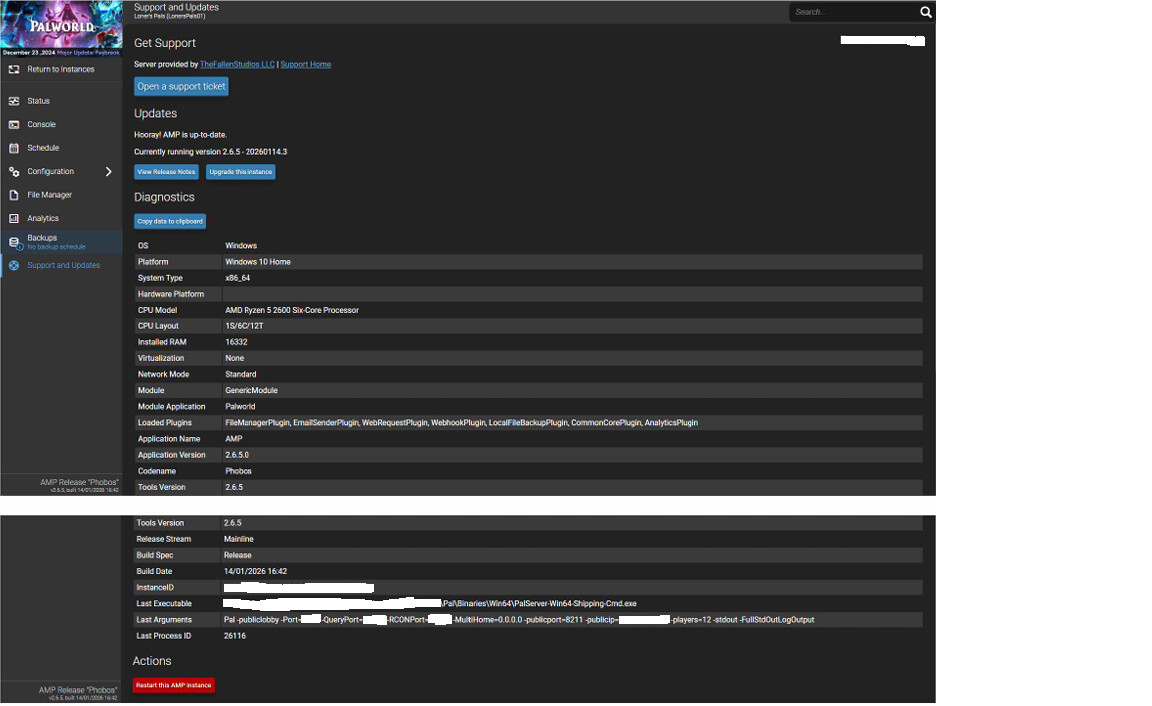
Can you show me the Support and Updates page for your instance after the server has started?
OK, your instance is still on the old template config that was causing issues with the recent Palworld update
Return to instances, stop the instance, click on the down arrow on the instance to update the config
Check the Deployment Log for any errors
If the update stuck, when you start the server next time, you won’t see -stdout -FullStdOutLogOutput at the end of the Last Arguments
If you still see that, repeat the above until it sticks (AMP can be temperamental about instance updates, which is very frustrating)
If there are errors in the Deployment Log when updating, it means another issue, that your config repos are not being successfully updated, which means the updates can’t then be applied to the instance
The above is the actual solution to the issues that popped up with Palworld 0.7.1. This solution allows mulithread performance improvements still to be used, and also allows UE4SS still to be used
Unfortunately it is at the expense of no console output, but Palworld barely has any regardless, nor does it produce any server logs (quite a crappy server imo)