Dune Awakening Server Guide

Hey Folks, first thanks for the great work. I have a Dune Server running on Ubuntu for roughly 10 days now and it worked fine till now. Yesterday I wanted to enter DD for the first time and here my problems began, it shows me two instances to select from although there should eb only one running, and when selecting any of it asks for the password. Regardless of which instance I choose and what password I do enter, it responds with an error P83, not letting me enter.

AMP Dune self-host on Ubuntu, server 1.4.10.3 / NetCL 2036754.
Only one DeepDesert_1 UE process, one server ID and one configured partition exist (partitionId 8, dimension 0, ready=true).

The client nevertheless shows two identical Deep Desert choices.
Overmap reports:
“Found multiple partitions (2) … map DeepDesert and dimension 0. Passing no partition to travel request”

Director then returns Code 3 with DestinationPartitionId=null, followed by “Invalid dimension”; client displays P83.director.ini reports DeepDesert_1=ClassicalInstancing, while the runtime handles the request as instancingMode=Dimension.

Could this be a duplicate/stale FLS partition registration or a
missing PvE/PvP partition distinction in the AMP template?

Any ideas on how to solve this? Is anyone else experiencing this?

Thanks

Try this version. Server at leasts starts for me, need to wait for next cycle to check if things changed. Set to 5.000 instead of 70.000 here as in the op.

[/Script/DuneSandbox.LandsraadSettings]

bIsLandsraadEnabled=True
Data=(m_NumberOfWeeksTermRetention=4,m_NumberOfDecreesToNominate=3,m_NumberOfGuildsInHighscoreList=5,m_TermStartedMessage=(Name="LandsraadTermStarted"),m_VotingStartedMessage=(Name="LandsraadVotingStarted"),m_TaskProgressedMessage=(Name="LandsraadProgressNotification"),m_DecreeActivatedMessage=(Name="LandsraadDecreeActivated"),m_bIsPlayerVotingEnabled=True,m_bIsTerritoryControlEnabled=True,m_BoardLayouts=(/Script/DuneSandbox.BoardLayoutDataAsset'"/Game/Dune/Systems/Landsraad/BoardLayouts/DefaultLandsraadBoardLayout.DefaultLandsraadBoardLayout"'),m_LandsraadVotingPeriodDurationInSec=118500,m_LandsraadCycleDurationInSeconds=604800,m_LandsraadSuspendedPeriodDurationInSeconds=300,m_FirstTaskRevealDelayFromCompetitionStartInSeconds=0.000000,m_LandsraadRevealedTaskTimestampMinuteDifference=1,m_LandsraadTaskProgressUpdateFrequency=15.000000,m_LandsraadTaskDailyRevealFrequency=25.000000,m_LandsraadProgressFactionBalanceCurve=/Script/Engine.CurveFloat'"/Game/Dune/Systems/Landsraad/Curve_LandsraadProgressFactionBalanceCurve.Curve_LandsraadProgressFactionBalanceCurve"',m_LandsraadContractsPerVotingBlock=3,m_LandsraadContractsRepeatCooldownSeconds=57600,m_LandsraadContractsMaxActiveAmount=3,m_LandsraadContractsAbandonCooldownSeconds=3600,m_LandsraadContractsDailyBonusPerDay=5,m_LandsraadContractsDailyBonusMax=35,m_LandsraadContractsDailyBonusReferenceTimestamp=1760572800,m_LandsraadContractsDailyBonusRefreshCycleLength=86400,m_LandsraadContractsTimeToShowRewardInteractiveNotification=30.000000,m_LandsraadContractsTimeToShowErrorNotification=70.000000,m_LandsraadContractsTimeToShowPendingClaimRewardTutorial=300,m_LandsraadTaskRewardsData="/Game/Dune/Systems/Landsraad/DA_TaskRewardsDataAsset.DA_TaskRewardsDataAsset",m_LandsraadHouseSelectContractDialogContentWidget="/Game/Dune/GUI/Widgets/Menus/Gameplay/PlayerMenu/Landsraad/W_LandsraadHouseSelectContractDialog.W_LandsraadHouseSelectContractDialog_C",m_LandsraadContractReportDialogContentWidget="/Game/Dune/GUI/Widgets/Menus/Gameplay/PlayerMenu/Landsraad/W_LandsraadContractReportDialog.W_LandsraadContractReportDialog_C",m_LandsraadClaimHouseRewardDialogWidget="/Game/Dune/GUI/Widgets/Menus/Gameplay/PlayerMenu/Landsraad/W_LandsraadHouseRewardClaimDialog.W_LandsraadHouseRewardClaimDialog_C",m_TaskGoalAmount=5000,m_ControlPointsPerCycle=2,m_LandsraadContractsUnlockGameplayTag=(TagName="Journey.LandsraadContractsUnlocked"),m_LandsraadContractsNewMarkerGameplayTags=(GameplayTags=((TagName="DialogueFlags.Factions.LandsraadOnboardingActive"))),m_ControlPointAreaMaterial="/Game/Dune/Systems/Landsraad/Materials/M_LandsRaadControlPointCapsule.M_LandsRaadControlPointCapsule")

Answer to my own post: Problem was gone after entering a Teststation on the World Map (entered and left immediatly). Suddenly DD worked as expected and do so since, also after daily restart after backup.

Having issues accessing the server. Have ports all exposed at the router pointing at Debian VM and I can see my server on https://dunestatus.com/worlds but can’t see it listed in game at all. Anyone have any ideas?

1 Like

Does anyone have suggestions for the server showing up in Dune but clients can never connect. All ports have been forwarded. I have tried, Debian, Ubuntu, and Fedora. All show up but never connect.

I have even tried two different routers in case there was a firewall issue.

1 Like

Well, i thought i figured it out. I did bind the local IP to the game. We can log into it locally only. Still cant get friends to log in from the WAN side. This makes no sense. Ports are forwarded, NAT reflection is on (pfsense) and i still cant get it to allow a connection from WAN side. Password prompt appears but it just sits and spins.

So i did figure it out this time. EVERY PORT listed has to be forwarded. Not just the game ports. So I have (4) port forward setups, to cover UDP 7777-7810 & TCP 5673, 15673 and 31982. I changed the manual public IP assignment back to automatic. Everything works as it should now. We can both log in locally and my friends can log in via WAN. I am using pFsense, so NAT Reflection is needed (Pure NAT).

Hi CubeCoders team,

Prefacing everything below that I have had OpenAI Codex working on this
I have used Codex to assist me with the Self Hosted servers since the initial release

Below is the report from Codex, after we tried debugging my existing instance, then created a brand new one to compare what was missing

I found what appears to be an AMP bootstrap/update issue affecting the latest Dune: Awakening story content.

Environment:

  • AMP 2.7.2.8

  • Linux/Podman deployment

  • Dune dedicated server Steam build 25396338

  • Existing server reproduced against a completely fresh AMP Dune instance and database

Symptom:

After the latest update, entering the new Arrakeen Spaceport story location left the client indefinitely displaying:

Connecting to Arrakeen Spaceport

It never advanced to the normal loading screen. Starting Story_HeighlinerDungeon did not help because that is a separate map.

The affected story flow appears to be:

  1. Arrakeen Spaceport / Orbital Monitor

  2. Destroyed Zanovar

Root cause:

Both an upgraded server and a completely fresh installation seeded only 31 rows in dune.world_partition.

The following maps were present in director_config.ini, DefaultGame.ini, and world-template.yaml, but absent from dune.world_partition:

  • CB_Story_DestroyedZanovar

  • CB_Story_OrbitalMonitor

  • CB_Arrakis_Story_Paranoid_PrayerRoom

  • CB_Arrakis_Story_Glutton_DiningRoom

  • CB_Arrakis_Generic_Sietch_Room

The package contains:

duneawakening/server/scripts/setup/update_maps.sh

That script lists all these maps. However, its update_maps() logic checks whether a map already exists in:

.spec.serverGroup.template.spec.sets

It only calls add_map() when the server-set entry is missing.

The current world template already contains server-set definitions for the new maps, so that check returns true. Consequently, add_map() is skipped and the corresponding database world-partition entry is never added.

In other words, the database-partition check and server-set check appear to be incorrectly coupled.

Evidence from a pristine installation:

  • Fresh download and first boot completed successfully.

  • Steam build was 25396338.

  • Fresh database still contained only partitions 1–31.

  • No Zanovar, Orbital Monitor, Prayer Room, Dining Room, or generic Sietch Room partition existed.

  • The Director configuration nevertheless contained sections for Destroyed Zanovar and Orbital Monitor.

  • DefaultGame.ini allowed both command-line levels.

Validated workaround:

I added the missing maps through Funcom’s existing database helper:

SELECT dune.add_partition_unique(
  'CB_Story_DestroyedZanovar',
  '{"box":{"max_x":1,"max_y":1,"min_x":0,"min_y":0},"type":"box2d_array"}',
  0
);

SELECT dune.add_partition_unique(
  'CB_Story_OrbitalMonitor',
  '{"box":{"max_x":1,"max_y":1,"min_x":0,"min_y":0},"type":"box2d_array"}',
  0
);

SELECT dune.add_partition_unique(
  'CB_Arrakis_Story_Paranoid_PrayerRoom',
  '{"box":{"max_x":1,"max_y":1,"min_x":0,"min_y":0},"type":"box2d_array"}',
  0
);

SELECT dune.add_partition_unique(
  'CB_Arrakis_Story_Glutton_DiningRoom',
  '{"box":{"max_x":1,"max_y":1,"min_x":0,"min_y":0},"type":"box2d_array"}',
  0
);

SELECT dune.add_partition_unique(
  'CB_Arrakis_Generic_Sietch_Room',
  '{"box":{"max_x":1,"max_y":1,"min_x":0,"min_y":0},"type":"box2d_array"}',
  0
);

On the existing database, these became partitions 32–36 and received the expected generated labels:

  • DestroyedZanovar_0

  • OrbitalMonitor_0

  • ParanoidRoom_0

  • GluttonRoom_0

  • SietchTalab_0

I then created/materialized the corresponding AMP mock-Kubernetes ServerSetScale resources.

Both critical maps now start successfully:

  • CB_Story_OrbitalMonitor: ready/alive

  • CB_Story_DestroyedZanovar: ready/alive

The original server now runs the five normal maps plus both story maps successfully.

Suggested fix:

  • Check/add .spec.database.template.spec.deployment.spec.worldPartitions independently from .spec.serverGroup.template.spec.sets.

  • Ensure update_maps.sh is invoked during both clean bootstrap and server updates.

  • Allocate partition IDs from the actual current maximum because partition 31 is already occupied by CB_SurvivalChallenge_Station_15 in the database I tested.

  • Materialize scale resources for newly added maps so on-demand travel can launch them.

I retained a pristine reproduction instance and can provide sanitized database output, AMP logs, Director configuration, or exact scale-resource payloads if useful.

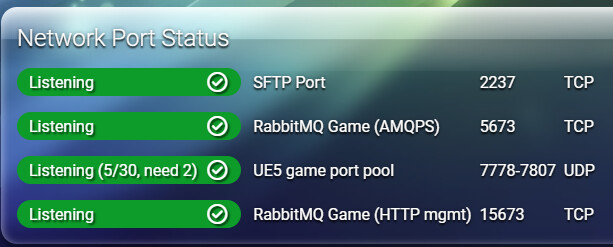
2 Likes

I’m actually having the same issue. Before the update we had 5 instances running and now we only appear to have 3. We can’t seem to travel to Arrakeen or Harko and just get stuck on “Connecting to”.

has there been updates to this? I can only go to Deep Dessert , haggabasin and overworld map. cannot enter anything else.

So is a fix ever going to be implemented for this?

Tossing in this discord link for the Windows + WSL + Docker timeout issue, at least then there is a reference to it that is easier to find again