OS Name/Version:
Debian GNU/Linux 12 for Controller
Windows Server 2022 for Targets
Product Name/Version: (Always use the full version number - not ‘Latest’)
Enterprise Edition / v2.6.0.6, built 20/11/2024 20:57
Problem Description:
Hello,
I have set up AMP according to the Advanced configuration and would now like to set up automation with WHMCS. When I create a template in AMP and then deploy it, it creates the user for me, the instance is generated, but the user cannot log in. The message appears:
Please ensure that this user has the ‘Manage Instance’ permission within ADS for this instance.
If I give the authorization in ADS, the user can see all instances. However, I only want the user to see his own instance. What settings do I have to make in ADS for this to work?
Steps to reproduce:
Step 1
I have created all the game server instances that I want to sell later.
Step 2
Under role management in ADS I have created a template role, without authorization - everything grayed out.
Step 3
Under role management in Target → Instance for Example Minecraft i have set all relevant settings which the user should use.
Step 4
I have create a template under Templates and then deployed it for testing. So far so good, the user is created, also the instance.
Step 5
I log in with the user which is created from deployment.
Step 6
I got the error above Manage Instance’ permission within ADS for this instance.
Actions taken to resolve so far:
I have tested various settings under ADS. However, a login for the user was only possible if I set everything to green under All instances. The result is that the user sees all game server instances. He should only see his own server.
I read in a post that you have to adjust the binding or enter a URL. I don’t want to do any of that. The user should connect to his instance via the controller. Everything must work automatically with WHMCS, without manual adjustment of a URL etc.
The Controller ADS’s manage permission doesn’t allow the user to see all instances, that would be something else.
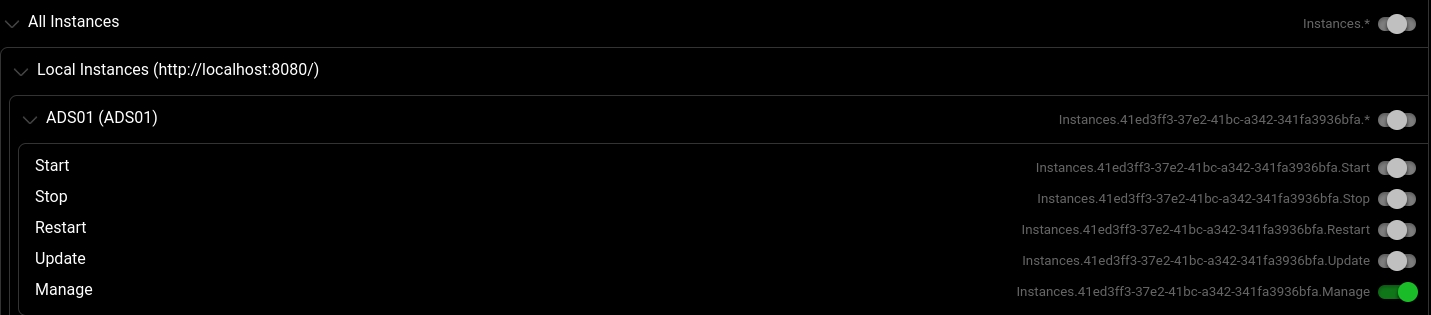
This is the permission the error is referring to:
All that permission does is allow the user to log in. The user can only see instances that they have that manage permission enabled for.
There’s a guide here that goes over user permissions quite well:
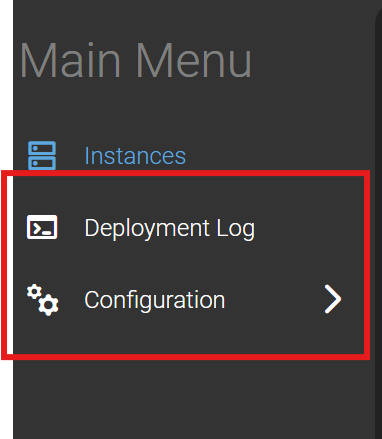
hello, thank you - it works now. one more thing. how can i remove the two points marked in the screenshot from the customer? Deployment Log and Configuration should not appear.
Double check that you’ve given them zero permissions at the top level, besides the manage permission.
They should not have permissions to view the ADS’s “console” (which is that Deployment Log), and they shouldn’t have access to settings.
You can go into the configuration tab there and see what permissions you might’ve accidentally given them.
You could also check in an incognito tab in case it’s your browser’s cache holding onto things
thanks for your help, i have now checked several times. on ads level controller and target all permissions are grayed out - except for the manage permission. the two points deployment log and configuration still appear. in the configuration tab everything is empty, no entry, but still present (would not be so bad). the deployment log also contains the complete log of other users and my super admin. i have also checked with an ikognito tab and cleared the cache, but these two tabs still appear. i will now test inden i create a new template with the same settings - or does anyone else have an idea?
That is a bit odd. What if you remove the View Console permission from the user’s role inside the game server instance? If that prevents them from seeing the ADS’s console that could be the cause, and would be a bug in AMP
then i’ve recently had another problem with the file manager. it suddenly appears in the ads again. if i remove the file manager at instance level, it also disappears again.
i would like to allow users to use the console and the file manager, but only at instance level and not ads
Yeah that would be a bug with how AMP is handling the Template Role, for the time being you can disallow users from managing the ADS, then give them the direct URL to their instances (as explained in the guide)
I personally don’t run an Enterprise setup so I’m not too sure. You could join the AMP Discord and link your account with the licenece manager to get access to the Enterprise support channel, then see what others have done to get around the issue.
Depending on how things are set up, you could maybe auto-generate the URL in the email, as the URL is based on the short instance ID, but the long ID format also works if I remember correctly.