System Information
| Field |
Value |
| Operating System |
Linux - Debian GNU/Linux 12 on x86_64 |
| Product |
AMP ‘Phobos’ v2.6.0.12 (Mainline) |
| Virtualization |
Docker |
| Application |
DayZ (Stable) |
| Module |
GenericModule |
| Running in Container |
Yes |
| Current State |
Ready |
Problem Description
Issue
Hi there, i’ve run DayZ servers in the past on windows and curious what my issue could be. I’ve added the mod IDs to the steam workshop items under the updates menu and have them input on the DayZ config, however when i update the instance or reboot it the mods do not appear in the workshop folder and no profiles folder is generated (would happen if the mod was loaded) Can i get some assitance? Thank you.
Reproduction Steps
- Add mods to steam workshop items
- Update Server instance to download mods
- Added Mod IDs to DayZ server config
You will need to show the relevant settings
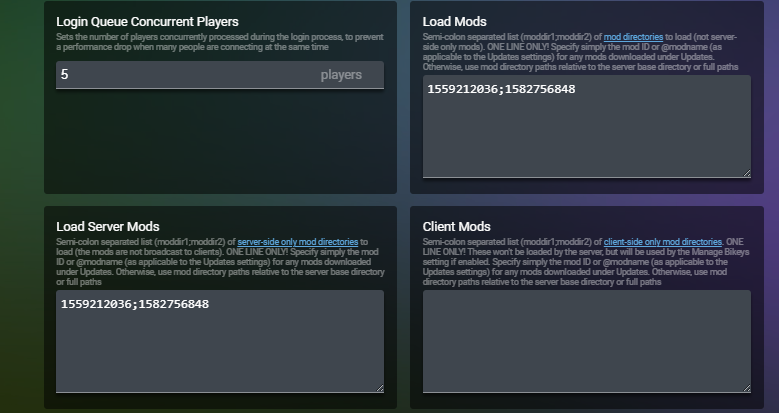
Thanks for the reply, these? I tried adding more messages but it blocked from doing so since I’m a new user.
You don’t need them listed in both Load Mods and Load Server Mods
See DayZ Server Guide
Can you elborate a bit more? I’ve read the guide a few times, I have the mods listed under updates steam workshop mods and then again in the DayZ config. I’ve tried to use just the “Load Mods” text box and just the “Load server mods” and neither seem to work. The mods never download into the server instance itself.
When one of these mods runs it’s supposed to generate a server profiles folder within the server root folder. Nothing gets generated with my attempts.
Did you update the server to download the mods?
Does the account you are using to login to steam own the game?
Yes, the account is my own. It owns DayZ since around 2018. I did run the update to download the mods but nothing populates and no folders are created. Mod IDs still persist in the steam workshop section and the DayZ config settings.
What shows in the console when you update the server?