Connectivity Problem with Minecraft - no one outside my network can join my minecraft server

System Information

Field Value
Operating System Linux - Debian GNU/Linux 13 on x86_64
Product AMP ‘Proteus’ v2.8.0.4 (Mainline)
Virtualization Podman
Application Minecraft
Module MinecraftModule
Running in Container Yes
Current State Ready

Problem Description

Issue

i have opened all my ports for mine craft and allowed them through my fire wall, i can connect but no one else outside can

Reproduction Steps

  • start server
  • open all the ports on my network and firewall
  • provide the ip to friends and they cant connect

Did you use port forwarding or just open the ports?

i have forwarded the ports and opened them in my firewall, i can connect but my friends getsockopt error every time

See if your internet provider uses CGNAT. If so, see this thread:

no they do not, i also was just hosting a palworld server with no problems just yesterday, so as far as i can tell this is just a minecraft issue

Since it is a socket error, there has to be some issue with a firewall blocking it, either on the server or the router. Are you forwarding BOTH UDP/TCP for 25565 on the router and have both open on the server? Since you can connect locally, I would think the server is good and there is a router problem.

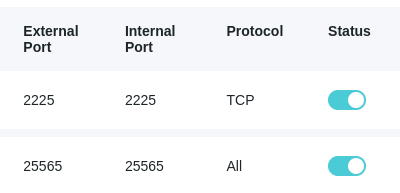
yes i have them open on the server and i have them forwarded on my router, i have also called my isp any they are not blocking any traffic.

image

Ok, do you have the setting under Configuration-Minecraft-Network set for standalone server on (assuming your not using a proxy)?

If that is not it, then I am out of ideas.

yea its on, i appreciate your help. i will try running this server without AMP and see if that works

You could try running

ampinstmgr rebind

from the terminal just to make sure there isn’t an issue there. Do you have IPv6 turned off?

Just found this too…

Sorry to reedit…this one is bugging me. Found someone with similar issue and they posted this:

Alright. I have finally got this working. The problem was the modem from the ISP. My router sits downstream from the modem, in bridge mode, but for whatever reason bridge mode doesn’t actually bridge unless you also turn off NAT manually. IDK why the default setting for bridge mode is double NAT and no pass through but this is centurylink at its finest.