No my server running truenas with an ubuntu vm which has amp has a ubiquity switch. also i just tried turning off upnp and trying and no change still same issue. i used to use crafty for mc server hosting (no vm just through debian) and it was fine with the router, not sure if this is further complicated by adding a vm to be honest im pretty new to self hosting so
It shouldn’t behave this way whether on a VM or bare metal. When you use the local IP the router shouldn’t be involved in any way if they’re on the same subnet, which yours are. It honestly sounds like you need a router that’s not controlled by your ISP to get it working properly. But one way you can get around it is putting a free VPN on your computer you’re playing from and only turn it on when you want to access the game. That will force your PC to connect externally without the mess your ISP’s router is causing.
Yeah gpt and you have come to the same conclusion lol, im really trying to avoid getting another router tbh, and i can run tailscale from my LAN pcs which isnt a huge issue I just know its not a fix and more of a bandaid, probably not something yall would do but do you guys do any remote control work, i really dont know enough to test or confirm whats happening is happing or anything like that.
I only usually ever connect to the AMP panel itself and that’s only in rare occasions due to liability. But you’ve kind of already troubleshot all there is to do. The fact a local connection is being routed through the router instead of locally is a big sign your ISP has a poorly designed router that’s not following standard networking.
My apologies that I dropped you Ryan…I missed that I didn’t follow up on this.
Would a cheap switch (like a 5 port that your system and server plug into, with another then going to the router) be an option? Not sure if an unmanaged would work, but I would think a managed switch would as it could bypass the router.
It might work since that should bypass the router fully.
So just gaming pc and server plugged into the switch so they could just communicate directly without the router? And not a problem I know yall are busy, as long as i get the server up and running for winter time lol
RIght. The router would need to plug into the switch as well though to keep internet access.
The only thing I am unsure of is if an unmanaged (dumb) switch will work or not. I would try it if you have one first as they are cheaper.
well it worked! such an easy thing to just exclude the router from any testing but i guess that pins it down as the culprit! i had my friend and i on my MC server today and it was running great! Since i am new to AMP i wanted to test another server so i booted up astroneer and my friend was able to connect to it with my public ip but unfortunately i am unable to connect I see it when typing in my public ip but i cannot see anything using the local IP or 0.0.0.0 (when should i use this for connecting to a hosted server)
You should see it with the local ip if the switch fixed it on Minecraft. Did you use a managed or unmanaged switch?
ill be honest i dont know what type it is i know it has the ability to be managed its a USW Flex 2.5G 5 USBC, I do have the unifi app on my server runnig but i havent really set anything up fancy wise for the switch just plug and play right now
Ok, it will be managed by default, so it will definately be bypassing your router for communication between your local machine and the game server. Thanks…was curious if unmanaged would do the same but my curiosity will remain 
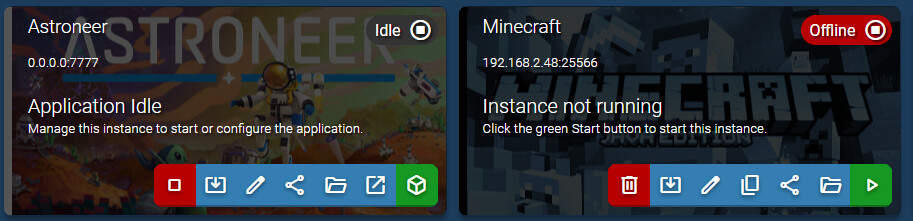
The 0.0.0.0 one is only from that machine itself. You wouldn’t be able to connect from another machine with that address. You world use the 192 one with the 7777 port.
You can open a terminal on the server as well and type
ip addr
to confirm the local address IP.
sshed into my vm and ran it definitely 192.168.2.48
ryan@ubunruamp:~$ ip addr
1: lo: <LOOPBACK,UP,LOWER_UP> mtu 65536 qdisc noqueue state UNKNOWN group default qlen 1000
link/loopback 00:00:00:00:00:00 brd 00:00:00:00:00:00
inet 127.0.0.1/8 scope host lo
valid_lft forever preferred_lft forever
inet6 ::1/128 scope host noprefixroute
valid_lft forever preferred_lft forever
2: ens3: <BROADCAST,MULTICAST,UP,LOWER_UP> mtu 1500 qdisc pfifo_fast state UP group default qlen 1000
link/ether 00:a0:98:59:20:71 brd ff:ff:ff:ff:ff:ff
altname enp0s3
altname enx00a098592071
inet 192.168.2.48/24 metric 100 brd 192.168.2.255 scope global dynamic ens3
valid_lft 216674sec preferred_lft 216674sec
inet6 fe80::2a0:98ff:fe59:2071/64 scope link proto kernel_ll
valid_lft forever preferred_lft forever
ryan@ubunruamp:~$
So are you not able to connect to the Astroneer server from the LAN?
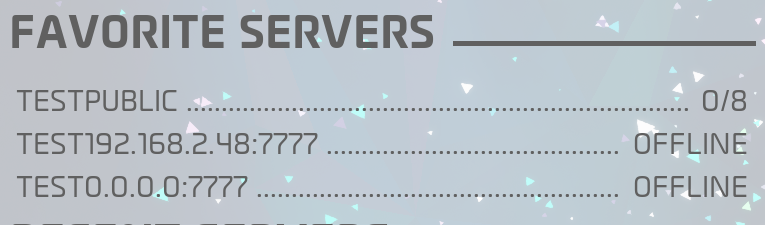
Did some goggleing and it turns out this is an Astroneer issue…
You cannot connect to an Astroneer server using a local or internal IP address (192.168.x.x) because the Astroneer client requires your public IP address to connect, even when you are playing on the same local network. [1, 2]
If you are trying to connect to a server hosted on your own network or machine and getting a connection error, use these solutions:
Use Your Public IP and Check NAT Loopback
- Use Public IP: Enter your public IP address and port in the game client instead of the local network IP.
- Enable NAT Loopback: If using your public IP from inside your home network fails, your router may be blocking NAT Loopback (or NAT Hairpin), which lets local traffic loop out and back in. Check your router settings to see if NAT loopback/hairpinning can be enabled.
Also found this
Well that opens it back up lol, either i need to vpn in so i dont have a nat issue OR get a router and run it in bridge mode, unfortunately that leads us back to square 1 kinda but it does give a bit of insight, maybe long term a new router is favourable and is going to solve a lot of issues going forward.
Sorry about that. This is the first game I’ve had that come up with. In any event good luck with you for your future servers.