This task could not be completed: Create instance - DayZ (Stable) - State: 3.
Problem Description
Issue
While trying to create a DayZ Stable instance i get the following Error message and its not created:
This task could not be completed: Create instance - DayZ (Stable) - State: 3.
I have installed all the required VCredists from the list and direct X. System is Windows Server 2016.
Reproduction Steps
i cant even create the instance so there are no real steps.
i cant even create the instance so there are no real steps.2
i cant even create the instance so there are no real steps.3
Non-managed instances exist, autoconfigure cannot guarantee that the configuration is valid!
Create Instance Failed: The core archive failed to download or unpack: The ADS version 2.5.0.12 is lower than the minimum version of 2.5.1.8 for this template
well yes, its outdated right now because i havent touched it in a while. when i created the ticket it was up to date. im working on updating it rn but the updater doesnt work. so i gotta do it manually. one moment please.
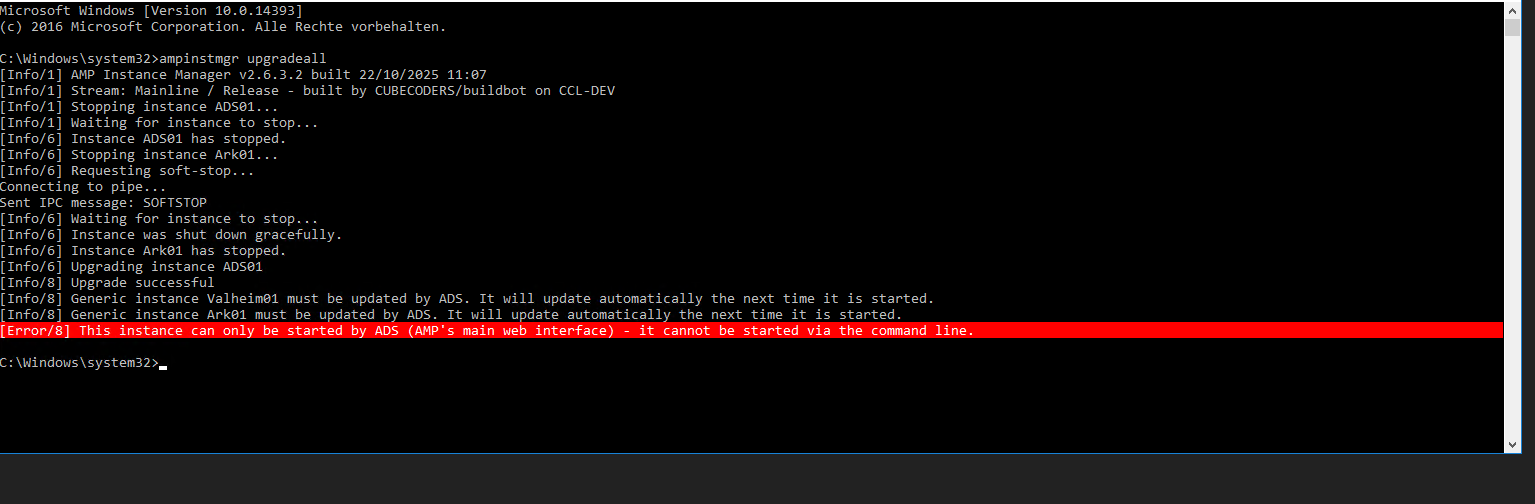
funky. because i already reinstalled with a fresh download and did the CMD upgradeall steps aswell before creating the ticket. but im repeating everything right now, ill let you know in a minute how it went.
after the 4th try it seems to have worked.
Whats still funky is, that i deleted the Valheim instance twice now, but every time it restarts, its back again
You seem to be running AMP in an Administrator command prompt? In general, and except in very specific cases, that’s a no-no
I’d assume that the Valheim instance is not deleting because file perms are busted on the instance datastore
You can try deleting the contents of the Valheim instance directory in Windows Explorer (but keep the directory itself), then delete the instance again via the AMP UI