Update Failure with Team Fortress 2 (64 Bit) - tf2 64 bit Application IP Binding

System Information

Field Value
Operating System Linux - Ubuntu 24.04.2 on x86_64
Product AMP ‘Phobos’ v2.6.2.2 (Mainline)
Virtualization None
Application Team Fortress 2 (64 Bit)
Module GenericModule
Running in Container No
Current State Failed

Problem Description

Issue

This just doesn’t seem to work for some reason, and I don’t know what I’m doing wrong. I just want to get over this hump of why it’s not working. I start it with nothing changed or added and I don’t know what it wants.

Reproduction Steps

  • create instance
  • start instance
  • get told that instance can’t start with Application IP binding set to 0.0.0.0 or 127 etc
  • select other options other than those two in the edit settings window of the instance
  • try all options and get told that none of them work
  • cry, wondering ‘what am I doing wrong?’ to whoever hears you

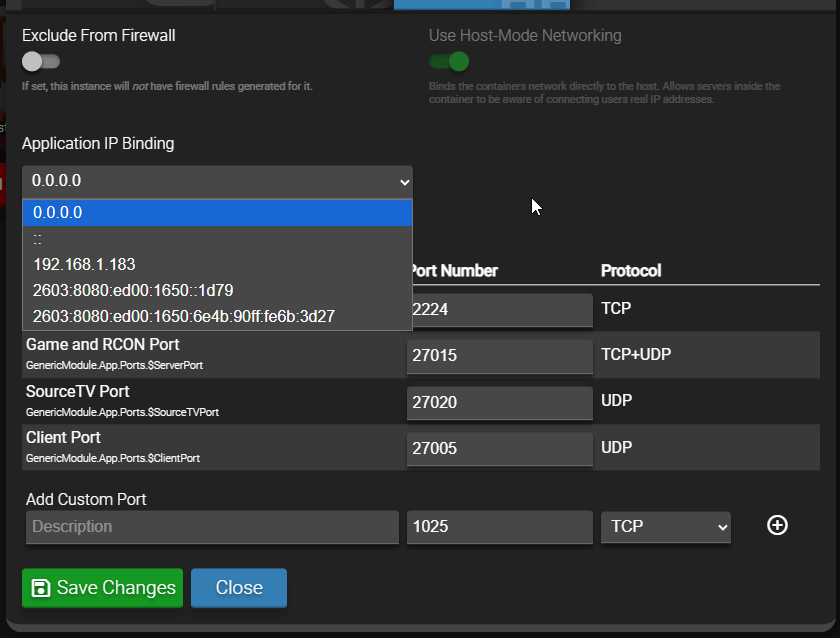
What options do you get in the ip address dropdown?

Default settings with a new instance

Select 192.168.1.183, that should be fine

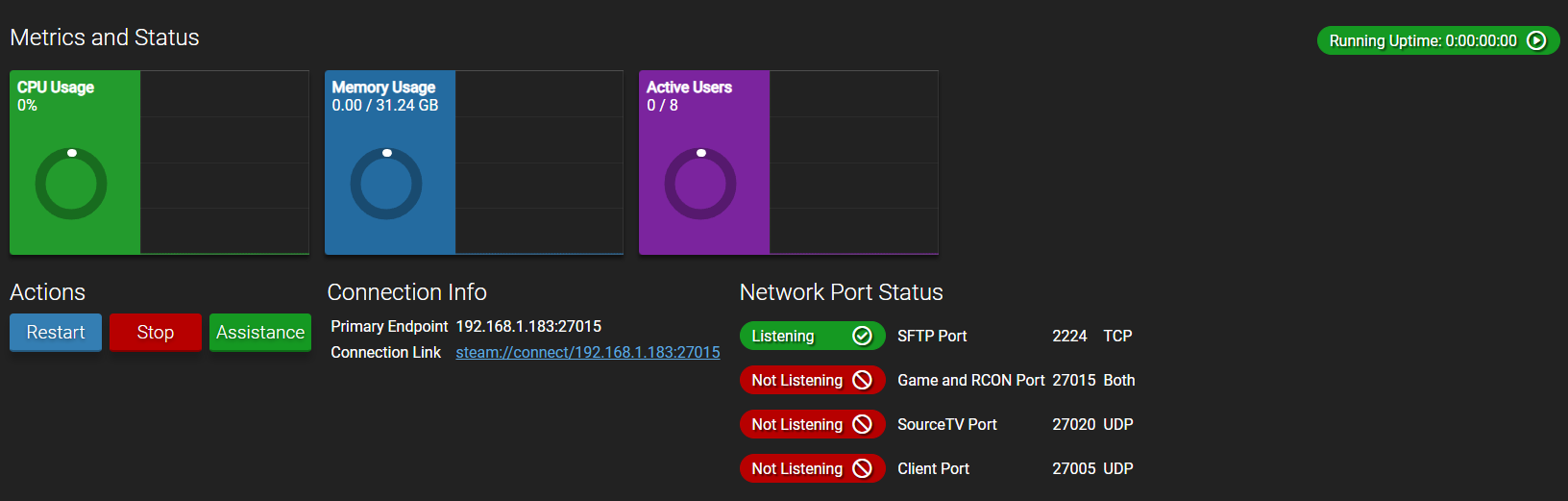
Ok, I flip it to that IP and now I get this issue.


I try joining the server and it fails

On your system, run ip a and post the output?

1: lo: <LOOPBACK,UP,LOWER_UP> mtu 65536 qdisc noqueue state UNKNOWN group default qlen 1000
    link/loopback 00:00:00:00:00:00 brd 00:00:00:00:00:00
    inet 127.0.0.1/8 scope host lo
       valid_lft forever preferred_lft forever
    inet6 ::1/128 scope host noprefixroute
       valid_lft forever preferred_lft forever
2: enp0s31f6: <BROADCAST,MULTICAST,UP,LOWER_UP> mtu 1500 qdisc fq_codel state UP group default qlen 1000
    link/ether 6c:4b:90:6b:3d:27 brd ff:ff:ff:ff:ff:ff
    inet 192.168.1.183/24 metric 100 brd 192.168.1.255 scope global dynamic enp0s31f6
       valid_lft 28815sec preferred_lft 28815sec
    inet6 2603:8080:ed00:1650::1d79/128 scope global dynamic noprefixroute
       valid_lft 508601sec preferred_lft 508601sec
    inet6 2603:8080:ed00:1650:6e4b:90ff:fe6b:3d27/64 scope global dynamic mngtmpaddr noprefixroute
       valid_lft 604705sec preferred_lft 604705sec
    inet6 fe80::6e4b:90ff:fe6b:3d27/64 scope link
       valid_lft forever preferred_lft forever

Forgot to mention I have webmin installed too

You don’t have anything else running on the system that is trying to use any of those ports?

Any output from the following (run as root):

ss -tulpn | grep 270

I tried doing port forwarding on spectrum isp app and it turns out I had the port opened for Helldivers 2 a while back, I moved it over to the Amp panel port rules along with tf2.

  1. I tried on a fresh instance
  2. started it
  3. it needed the app ip binding to the ip address
  4. switched it over, restarted when asked
  5. started it, it was fine
  6. shut it off
  7. switched the starting map to an MVM map
  8. started it back up, it started fine
  9. I shut it down
  10. I put in the Game Server Login Token
  11. start it up
  12. instance won’t start anymore and it still looks like this

oh and the ss -tulpn | grep 270 came back blank when I ran it as root

Has the GSLT expired? Was it generated for the right app id?

I regenerated it just in case and it’s the right app id (440), still nothing

Did a bit of testing myself. Seems with MVM maps you need to increase the player limit to 32 (to allow proper bot spawn, because they are counted as part of max players). When I did that, it was fine
1 Like

holy moly, that was it! That worked! Thank you for your time! :smiley:

This topic was automatically closed 30 days after the last reply. New replies are no longer allowed.