System Information
| Field |
Value |
| Operating System |
Linux - Debian GNU/Linux 13 on x86_64 |
| Product |
AMP ‘Proteus’ v2.8.0.4 (Mainline) |
| Virtualization |
Docker |
| Application |
Resonite |
| Module |
GenericModule |
| Running in Container |
Yes |
| Current State |
Stopped |
Problem Description
Issue
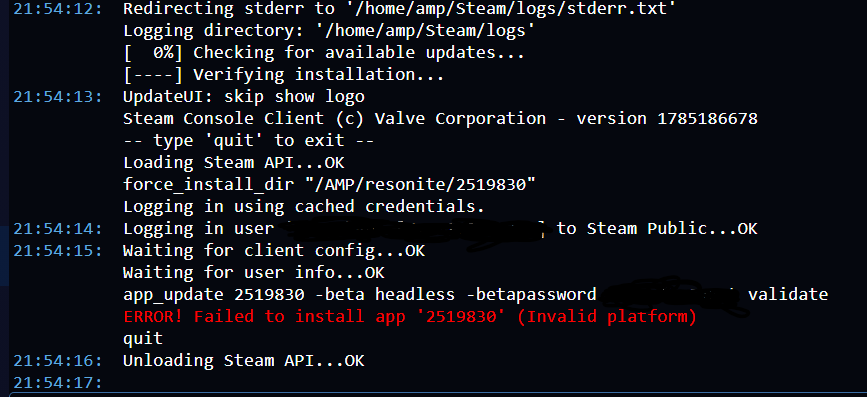
I tried to update resonite and it wouldn’t let me login to steam so i created a new instance. when i tried to update it gave me error “ERROR! Failed to install app ‘2519830’ (Invalid platform)”. I have remade the instance multiple times and it doesn’t work. I don’t know what else to try.
Reproduction Steps
- create resonite instance
- update resonite
- get error “ERROR! Failed to install app ‘2519830’ (Invalid platform)”
Normally that is because you are trying to install a windows version on linux or linux on windows.
Check the template you are using to see if there is a setting to toggle. You can do it directly in Steamcmd, with the below, so there may be something in your template for it.
When using SteamCMD, make sure to specify the correct platform type. For example:
- For Linux:
+@sSteamCmdForcePlatformType linux
- For Windows:
+@sSteamCmdForcePlatformType windows
I’m using Linux how do I check the template or steamcmd I’m still getting used to amp and Linux
When you first created the instance, Resonite is not in the default list of games to select. You would have had to go into creating a custom template unless you had a link to someone else’s template you loaded. When you went through the configuration, it would be in there. I have not ever manually made a template, so I can’t assist you with that.
I’m using Greenlan’s GitHub. I’ve been using the instance for almost a year or more now. it just started doing this after my steam got hacked.
@IceOfWraith Any tips on how he can edit the template to pick up the correct install? I don’t even see Resonite in Greelan github list.
It was put under the dev repository.
I found it once you pointed me at dev. Went and looked through files.
From what I read elsewhere it looks like steamcmd made a change on installing last year that looks at your OS and only installs the supported server by default. As there is no linux server for Resonite, you need to pass “+@sSteamCmdForcePlatformType windows” as part of the steamcmd flags. I haven’t found a way to do that through AMP itself. Looking at Ice’s template generator, it looks like it can be done through there, but that requires generating an entirely new template. Hopefully Ice will see the tag I put on there (or maybe @Greelan can do an edit to his template on github)? Since you are on Discord, you could try asking them there directly as well.
That about all I can suggest as I just don’t know enough about building the templates to help more.
If you find out a fix other than rebuilding the template, post it so it will searchable in the future.
That’s the ironic thing. It does support Linux. They have an option to use Linux steam cmd or windows. That’s what confuses me more.
It’s because they have wrongly marked the metadata for supported platform as only Windows. Even tho the depot supports both Windows and Linux. Typical devs not knowing what they are doing
Anyway, template updated to force Windows. Given Windows and Linux share the same depot that should work
Thank you @Greelan that fixed it
Thanks Greelan! Appreciate it!