System Information
| Field | Value |
|---|---|
| Operating System | Linux - Debian GNU/Linux 13 on x86_64 |
| Product | AMP ‘Deimos’ v2.7.0.0 (Mainline) |
| Virtualization | Podman |
| Application | Minecraft |
| Module | MinecraftModule |
| Running in Container | Yes |
| Current State | Ready |
Problem Description
Issue
The Console is currently displaying the following error many times: “```vbnet
Error: LinkageError occurred while loading main class net.minecraft.bundler.Main
java.lang.UnsupportedClassVersionError: net/minecraft/bundler/Main has been compiled by a more recent version of the Java Runtime (class file version 69.0), this version of the Java Runtime only recognizes class file versions up to 65.0”. I’ve restored an earlier backup, and it is running, but this error is displayed continuously. How would I fix this?
Reproduction Steps
- Created the minecraft server several weeks ago.
- Recently clicked Update.
- Just checked today, and it was not running, stating an error, and to check logs.
- Restored to a backup from a few days ago, this did not fix it.
- Used an even earlier backup, and this did start, but with errors.
Update:
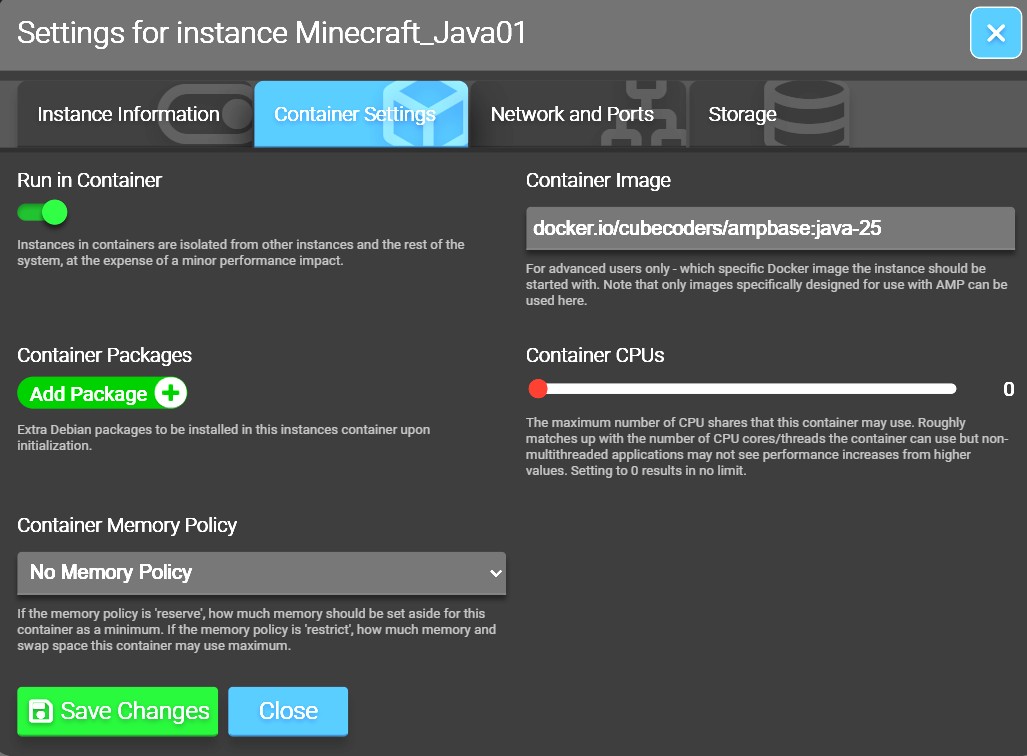
I figured it out. Within the AMP console, click the ‘pen’ icon (Edit Settings), then into the Container Settings tab. Mine is configured for ‘Run in Container’. I changed the ‘Container Image’ from ‘docker.io/cubecoders/ampbase:java’ to ‘docker.io/cubecoders/ampbase:java-25’. Once all settings were saved, I clicked to ‘Update Instance’ from the main Local Instances screen again, and Minecraft started fine. The problem is that the ‘:java’ container is running an older version of Java, and the latest Minecraft server requires a newer version. ‘:java-25’ contains a newer version of Java that works with this newer Minecraft version.
I hope this helps someone.