Hello,
when attempting to start the MySQL service within my AMP GamePanel, the server fails to launch and reports the following error:
mysql/bin/mysqld: error while loading shared libraries: libaio.so.1: cannot open shared object file: No such file or directory
This indicates that the system library libaio (required by MySQL for asynchronous I/O) is missing from the host environment. Since I do not have terminal or root access to the host system, I’m unable to install it myself.
How do i install libaio?
Reproduction Steps
Start or restart the AMP instance containing MySQL.
It should be installing the package in the Docker container when starting the instance, but is not
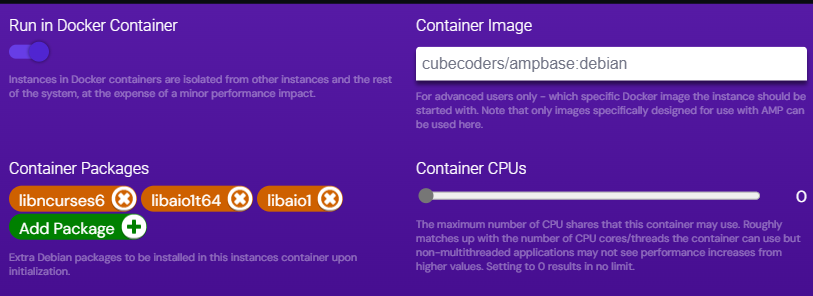
Click on the pencil icon on the instance, go to Container Settings, check that the package is listed under Extra container packages, and if so click Save Changes
Yes, saving what is already there seems to kick AMP into gear
The package name needs to be updated for debian 13, since it has changed from libaio1 to libaio1t64. Often debian is able to automatically transition the installation, not in this case
So you can manually change the extra container package name, or update your instance by clicking on the down arrow on the instance tile, and it will be fixed for you
I added the package, but i still get following error: mysql/bin/mysqld: error while loading shared libraries: libaio.so.1: cannot open shared object file: No such file or directory
Im going to add an screenshot of the config for clarity: