Startup Issue with Minecraft - Wont update to latest version of minecraft

System Information

Field Value
Operating System Linux - Ubuntu 24.04.4 on x86_64
Product AMP ‘Deimos’ v2.7.2.0 (Mainline)
Virtualization None
Application Minecraft
Module MinecraftModule
Running in Container No
Current State Failed

Problem Description

Issue

I am currently running a fabric server on 1.21.10. I tried to upgrade the instance to 26.1.2. When I do this it breaks the server. I currently have an unable to run error. The error message states “ The Minecraft server stopped within 5 seconds of starting, this is not a fault with AMP - you should check your Minecraft servers log files to find out why it is unable to start.” When I revert back to 1.21.10 the server works again. Any advice?

Reproduction Steps

  • went to config and upgraded minecraft version to 26.1.2
  • updated server
  • server fails to start and gives me an unable to run message

Have you checked the console for errors?

I just tried again and got this:

Caused by: java.lang.UnsupportedClassVersionError: net/minecraft/bundler/Main has been compiled by a more recent version of the Java Runtime (class file version 69.0), this version of the Java Runtime only recognizes class file versions up to 65.0

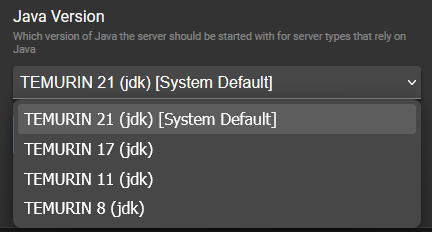
You need to select a newer java version in AMPs configuration.

Are you referring to this? I’ve selected the latest version available.

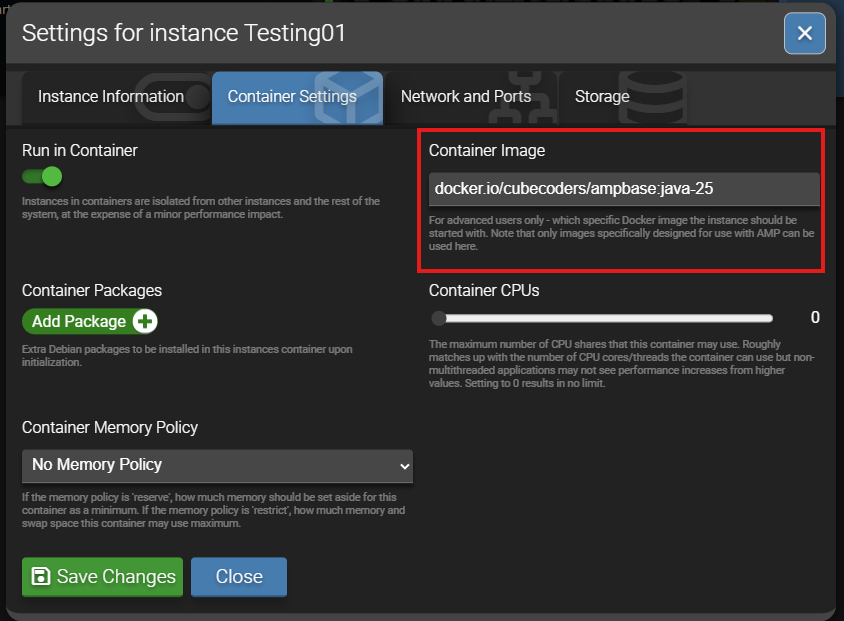
I had the same issue and spent way to long trying to figure it out last night. If you are running the Minecraft server on AMP using docker/ a container you need to select a docker image with java-25 included.

The Java Version in the drop down is if you are running it on the machine instead of in docker.

I’m not running this instance through a container but I may have to.

You could also install a newer version of java on your Ubuntu system. The below instructions were from the adoptium Temurin JDK 25 installation instructions. I followed these yesterday to install JDK 25 on my Debian VM.
Deb installation on Debian or Ubuntu

  1. Ensure the necessary packages are present:

    apt install -y wget apt-transport-https gpg
    
  2. Download the Eclipse Adoptium GPG key:

    wget -qO - https://packages.adoptium.net/artifactory/api/gpg/key/public | gpg --dearmor | tee /etc/apt/trusted.gpg.d/adoptium.gpg > /dev/null
    
  3. Configure the Eclipse Adoptium apt repository. To check the full list of versions supported take a look at the list in the tree at https://packages.adoptium.net/ui/native/deb/dists/.

    echo "deb https://packages.adoptium.net/artifactory/deb $(awk -F= '/^VERSION_CODENAME/{print$2}' /etc/os-release) main" | tee /etc/apt/sources.list.d/adoptium.list
    

    Tip

    For Linux Mint (based on Ubuntu) you have to replace VERSION_CODENAME with UBUNTU_CODENAME.

  4. Install the Temurin version you require:

    apt update # update if you haven't already
    apt install temurin-25-jdk
    
1 Like

That worked! Thank you so much!

1 Like