OS Name/Version: Ubuntu 22.04 LTS
Product Name/Version: AMP Release “Phobos” v2.6.5.2 (built 28/01/2026 16:00)
Problem Description:
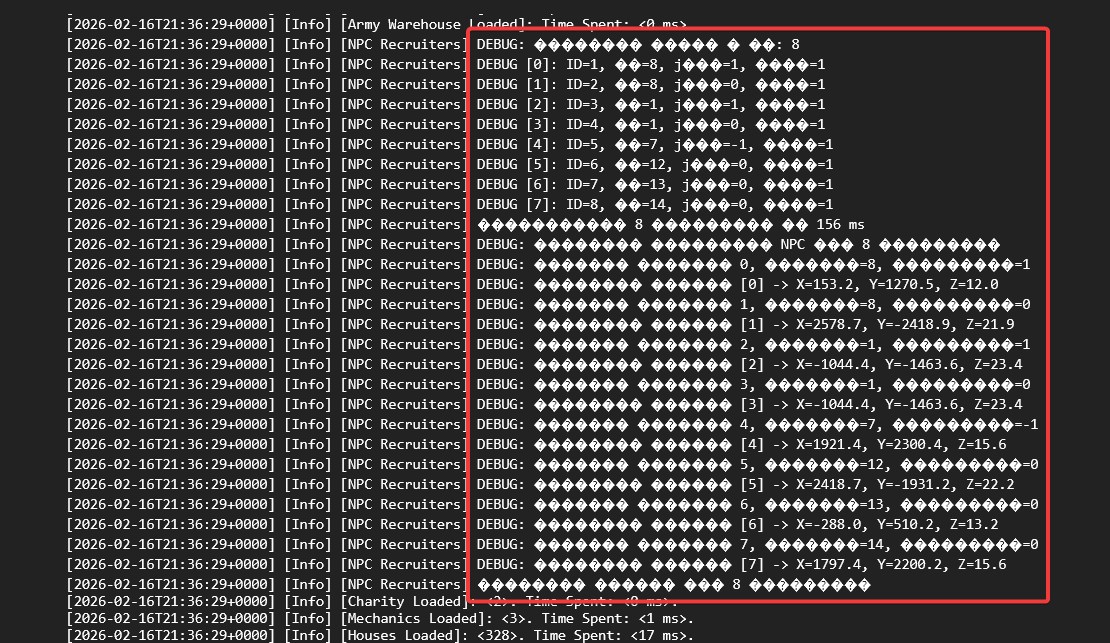
The game server console does not support Cyrillic characters. Any Russian text is displayed incorrectly; instead of letters, the console shows ��������. This makes it difficult to read logs/messages and administer the server in Russian. Please add proper Cyrillic (Unicode/UTF-8) support in the console output.
Steps to reproduce:
Step 1: Start the game server.
Step 2: Open the server console (local console/terminal where the server output is displayed).
Step 3: Print/type a Cyrillic string (e.g., Привет) or wait for a Russian message/log entry.
Result: Cyrillic characters appear as ��������.
Actions taken to resolve so far:
-
Verified the issue in the console output and confirmed it reproduces consistently
-
Restarted the server (no change)
-
Tried multiple different Russian/Cyrillic strings (same result:
��������)