OS Name/Version: Fedora 42 Server
Product Name/Version: AMP 2.6.5.2 - 20260128.2
Problem Description:
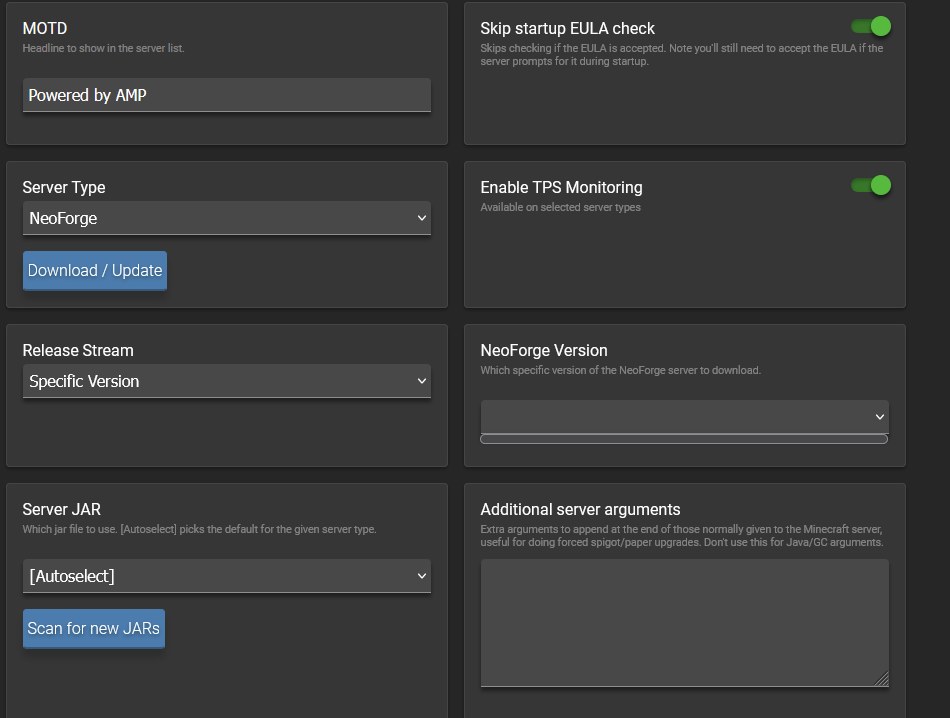
Minecraft Neforge jar select version dropdown menu not showing any version
Steps to reproduce:
Step 1: Open minecraft instance > manage > configuration > MInecraft > server and start upp
Step 2: Select NeoForge as server type, and Specific version for release stream.
Step 3: NeoForge Version drop down menu stays empty
Actions taken to resolve so far:
Updated AMP to most recent version
This is a brand new instance created after update, have tested a new instance with the same results.
4 Likes
def broke. also getting the same thing and deleting the xml does nothing
Luis1
9 February 2026 04:06
3
Can confirm that something is broken, deleting the NeoForgeVersionManifest.xml like suggested in some other topics does not fix the issue.
King
9 February 2026 04:41
4
Someone found a solution on Discord
Issue seem to be from Neoforged itself. Their Naven metadatafile seems to be empty
What works is to delete the current NeoForgeVersionManifest.xml, add an older one, and then reboot the instance.
I cannot attach the file here, but you can find it on Discord in the Minecraft text channel.
1 Like
is definitely right, I was able to find that file from the discord thread. If you go into your AMP main menu > File browser > Select the instance with the issue > Locate NeoForgeVersionManifest.xml, and copy and replace the content from the the new .xml into the old. I was able to edit the version just fine after this.
I tried to put the file contents in spoilers but it was 25k over the charater limit lol
system
12 March 2026 03:51
6
This topic was automatically closed 30 days after the last reply. New replies are no longer allowed.