OS Name/Version:
cat /etc/debian_version 13.5
debian trixie
Product Name/Version:
Proteus 2.8.0.0
Problem Description:
I am seeing two possibly separate issues with AMP Minecraft module instances.
Issue A: Changing MinecraftModule.Java.CustomOpts causes the affected AMP Minecraft instance controller to crash or become unavailable.
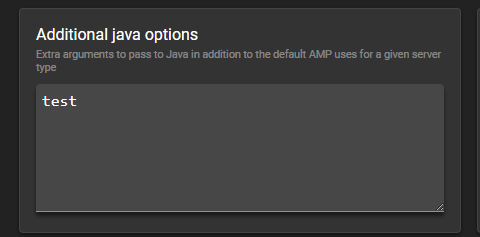
This is not proxy-specific. I have also observed the same behavior with a normal Vanilla Minecraft server instance. The issue occurs when changing the “Additional Java options” setting, even with a simple valid JVM option such as -Dfile.encoding=UTF-8, or a plain test value such as test.
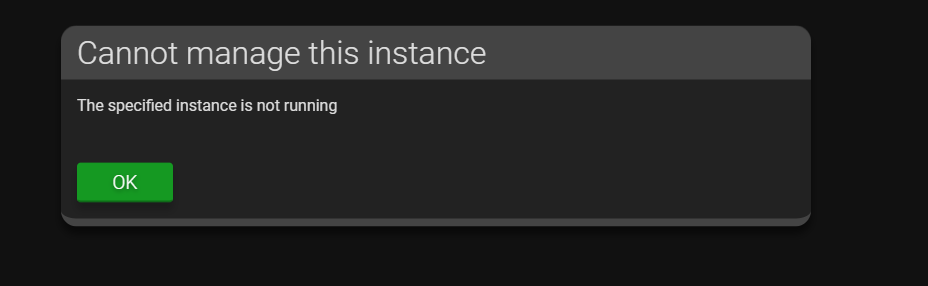
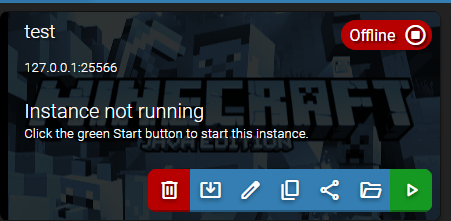
After applying the setting, the affected instance API port stops listening and ADS can no longer communicate with that instance until it is restarted via ampinstmgr.
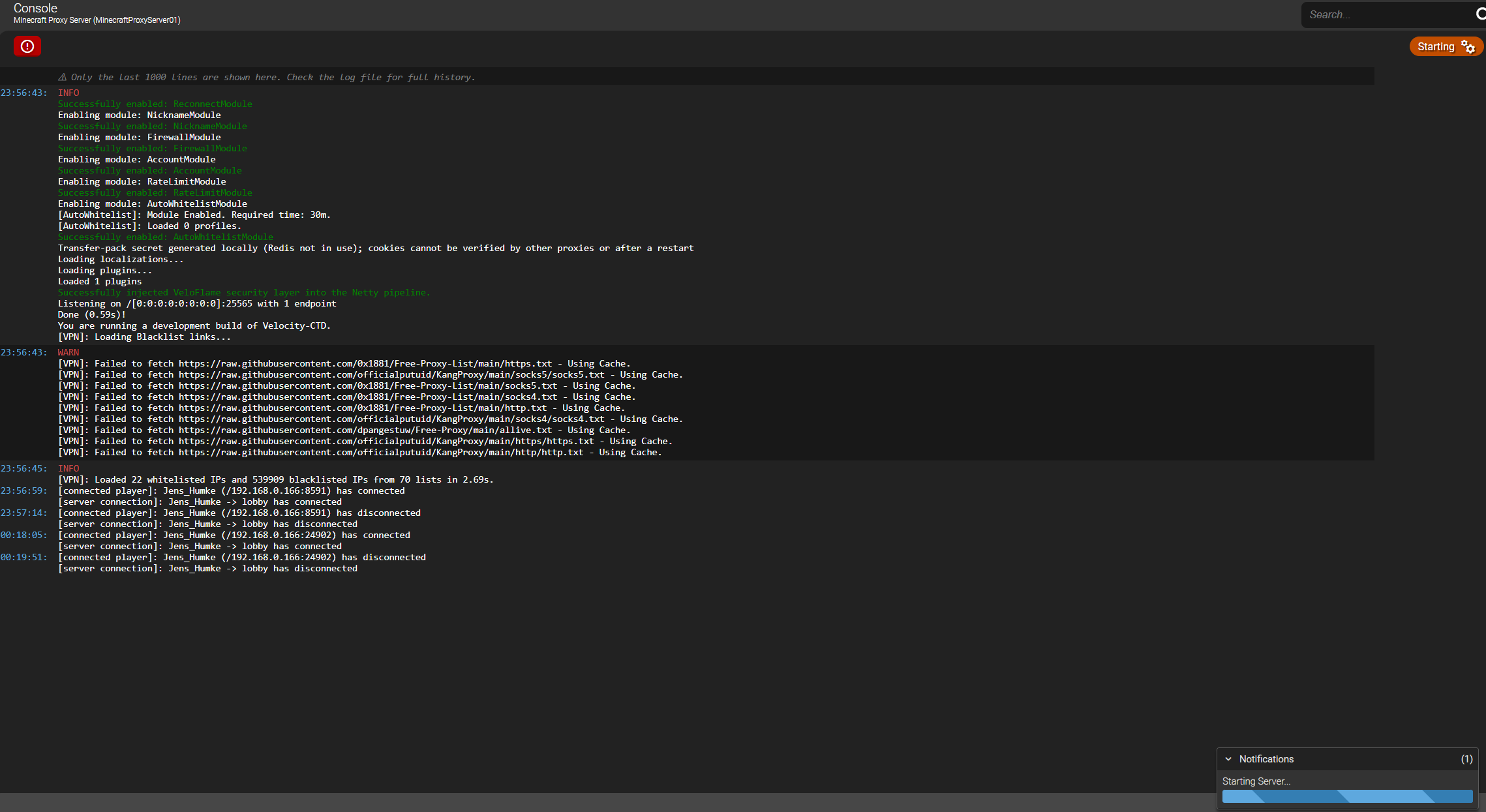
Issue B: A Velocity/VeloFlame proxy instance remains stuck in Starting.
This has only been observed with the proxy instance so far. The proxy process itself starts, listens on port 25565, accepts Minecraft client connections, and players can reach backend servers. However, AMP continues to show the game/process state as Starting, so this appears to be a ready-state detection issue for Velocity-style proxy applications in the Minecraft module.
journalctl of one Minecraft Instance affected after adding additional options:
journalctl CONTAINER_NAME=AMP_MinecraftProxyServer01 --since "30 min ago" --no-pager -n 200Jun 28 23:08:13 jens-srv-001 AMP_MinecraftProxyServer01[3221933]: at MinecraftModule.ModuleMain.Game_SettingModified(System.Object, ModuleShared.SettingModifiedEventArgs)Jun 28 23:08:13 jens-srv-001 AMP_MinecraftProxyServer01[3221933]: at MinecraftModule.ModuleMain.Game_SettingModified(System.Object, ModuleShared.SettingModifiedEventArgs)Jun 28 23:08:13 jens-srv-001 AMP_MinecraftProxyServer01[3221933]: at MinecraftModule.ModuleMain.Game_SettingModified(System.Object, ModuleShared.SettingModifiedEventArgs)Jun 28 23:08:13 jens-srv-001 AMP_MinecraftProxyServer01[3221933]: at MinecraftModule.ModuleMain.Game_SettingModified(System.Object, ModuleShared.SettingModifiedEventArgs)Jun 28 23:08:13 jens-srv-001 AMP_MinecraftProxyServer01[3221933]: at MinecraftModule.ModuleMain.Game_SettingModified(System.Object, ModuleShared.SettingModifiedEventArgs)Jun 28 23:08:13 jens-srv-001 AMP_MinecraftProxyServer01[3221933]: at MinecraftModule.ModuleMain.Game_SettingModified(System.Object, ModuleShared.SettingModifiedEventArgs)Jun 28 23:08:13 jens-srv-001 AMP_MinecraftProxyServer01[3221933]: at MinecraftModule.ModuleMain.Game_SettingModified(System.Object, ModuleShared.SettingModifiedEventArgs)Jun 28 23:08:13 jens-srv-001 AMP_MinecraftProxyServer01[3221933]: at MinecraftModule.ModuleMain.Game_SettingModified(System.Object, ModuleShared.SettingModifiedEventArgs)Jun 28 23:08:13 jens-srv-001 AMP_MinecraftProxyServer01[3221933]: at MinecraftModule.ModuleMain.Game_SettingModified(System.Object, ModuleShared.SettingModifiedEventArgs)Jun 28 23:08:13 jens-srv-001 AMP_MinecraftProxyServer01[3221933]: at MinecraftModule.ModuleMain.Game_SettingModified(System.Object, ModuleShared.SettingModifiedEventArgs)Jun 28 23:08:13 jens-srv-001 AMP_MinecraftProxyServer01[3221933]: at MinecraftModule.ModuleMain.Game_SettingModified(System.Object, ModuleShared.SettingModifiedEventArgs)Jun 28 23:08:13 jens-srv-001 AMP_MinecraftProxyServer01[3221933]: at MinecraftModule.ModuleMain.Game_SettingModified(System.Object, ModuleShared.SettingModifiedEventArgs)Jun 28 23:08:13 jens-srv-001 AMP_MinecraftProxyServer01[3221933]: at MinecraftModule.ModuleMain.Game_SettingModified(System.Object, ModuleShared.SettingModifiedEventArgs)Jun 28 23:08:13 jens-srv-001 AMP_MinecraftProxyServer01[3221933]: at MinecraftModule.ModuleMain.Game_SettingModified(System.Object, ModuleShared.SettingModifiedEventArgs)Jun 28 23:08:13 jens-srv-001 AMP_MinecraftProxyServer01[3221933]: at MinecraftModule.ModuleMain.Game_SettingModified(System.Object, ModuleShared.SettingModifiedEventArgs)Jun 28 23:08:13 jens-srv-001 AMP_MinecraftProxyServer01[3221933]: at MinecraftModule.ModuleMain.Game_SettingModified(System.Object, ModuleShared.SettingModifiedEventArgs)Jun 28 23:08:13 jens-srv-001 AMP_MinecraftProxyServer01[3221933]: at MinecraftModule.ModuleMain.Game_SettingModified(System.Object, ModuleShared.SettingModifiedEventArgs)Jun 28 23:08:13 jens-srv-001 AMP_MinecraftProxyServer01[3221933]: at MinecraftModule.ModuleMain.Game_SettingModified(System.Object, ModuleShared.SettingModifiedEventArgs)Jun 28 23:08:13 jens-srv-001 AMP_MinecraftProxyServer01[3221933]: at MinecraftModule.ModuleMain.Game_SettingModified(System.Object, ModuleShared.SettingModifiedEventArgs)Jun 28 23:08:13 jens-srv-001 AMP_MinecraftProxyServer01[3221933]: at MinecraftModule.ModuleMain.Game_SettingModified(System.Object, ModuleShared.SettingModifiedEventArgs)Jun 28 23:08:13 jens-srv-001 AMP_MinecraftProxyServer01[3221933]: at MinecraftModule.ModuleMain.Game_SettingModified(System.Object, ModuleShared.SettingModifiedEventArgs)Jun 28 23:08:13 jens-srv-001 AMP_MinecraftProxyServer01[3221933]: at MinecraftModule.ModuleMain.Game_SettingModified(System.Object, ModuleShared.SettingModifiedEventArgs)Jun 28 23:08:13 jens-srv-001 AMP_MinecraftProxyServer01[3221933]: at MinecraftModule.ModuleMain.Game_SettingModified(System.Object, ModuleShared.SettingModifiedEventArgs)Jun 28 23:08:13 jens-srv-001 AMP_MinecraftProxyServer01[3221933]: at MinecraftModule.ModuleMain.Game_SettingModified(System.Object, ModuleShared.SettingModifiedEventArgs)Jun 28 23:08:13 jens-srv-001 AMP_MinecraftProxyServer01[3221933]: at MinecraftModule.ModuleMain.Game_SettingModified(System.Object, ModuleShared.SettingModifiedEventArgs)Jun 28 23:08:13 jens-srv-001 AMP_MinecraftProxyServer01[3221933]: at MinecraftModule.ModuleMain.Game_SettingModified(System.Object, ModuleShared.SettingModifiedEventArgs)Jun 28 23:08:13 jens-srv-001 AMP_MinecraftProxyServer01[3221933]: at MinecraftModule.ModuleMain.Game_SettingModified(System.Object, ModuleShared.SettingModifiedEventArgs)Jun 28 23:08:13 jens-srv-001 AMP_MinecraftProxyServer01[3221933]: at MinecraftModule.ModuleMain.Game_SettingModified(System.Object, ModuleShared.SettingModifiedEventArgs)Jun 28 23:08:13 jens-srv-001
Log of the Minecraft Proxy Server (starting loop):
WARNING: A restricted method in java.lang.foreign.MemorySegment has been called
WARNING: java.lang.foreign.MemorySegment::reinterpret has been called by org.jline.terminal.impl.ffm.FfmTerminalProvider in an unnamed module (file:/AMP/Minecraft/VeloFlame-Pro.jar)
WARNING: Use --enable-native-access=ALL-UNNAMED to avoid a warning for callers in this module
WARNING: Restricted methods will be blocked in a future release unless native access is enabled
2026-06-28T23:24:23.566364251Z main WARN Advanced terminal features are not available in this environment
Booting up VeloFlame 3.5.0-SNAPSHOT-git-c91ac307...
Connections will use epoll channels, libdeflate (Linux x86_64) compression, OpenSSL 3.x.x (Linux x86_64) ciphers
Enabled VeloFlame Version 1.3.6 (PRO)
Loading module: FirewallModule
Loading module: RateLimitModule
Loading module: VpnModule
Loading module: VpnOnlineModule
Loading module: AccountModule
Loading module: ReconnectModule
Loading module: NicknameModule
Loading module: AutoWhitelistModule
Loading module: CountryModule
Total modules loaded: 9
Enabling 9 modules
Enabling module: VpnOnlineModule
Successfully enabled: VpnOnlineModule
Enabling module: VpnModule
Successfully enabled: VpnModule
Enabling module: CountryModule
[VPN]: Loading Whitelist links...
Successfully enabled: CountryModule
Enabling module: ReconnectModule
Successfully enabled: ReconnectModule
Enabling module: NicknameModule
Successfully enabled: NicknameModule
Enabling module: FirewallModule
Successfully enabled: FirewallModule
Enabling module: AccountModule
Successfully enabled: AccountModule
Enabling module: RateLimitModule
Successfully enabled: RateLimitModule
Enabling module: AutoWhitelistModule
[AutoWhitelist]: Module Enabled. Required time: 30m.
[AutoWhitelist]: Loaded 0 profiles.
Successfully enabled: AutoWhitelistModule
Transfer-pack secret generated locally (Redis not in use); cookies cannot be verified by other proxies or after a restart
Loading localizations...
Loading plugins...
Loaded 1 plugins
Successfully injected VeloFlame security layer into the Netty pipeline.
Listening on /[0:0:0:0:0:0:0:0]:25565 with 1 endpoint
Done (0.65s)!
You are running a development build of Velocity-CTD.
[VPN]: Loading Blacklist links...
[VPN]: Failed to fetch https://raw.githubusercontent.com/officialputuid/KangProxy/main/socks5/socks5.txt - Using Cache.
[VPN]: Failed to fetch https://raw.githubusercontent.com/0x1881/Free-Proxy-List/main/https.txt - Using Cache.
[VPN]: Failed to fetch https://raw.githubusercontent.com/0x1881/Free-Proxy-List/main/socks5.txt - Using Cache.
[VPN]: Failed to fetch https://raw.githubusercontent.com/officialputuid/KangProxy/main/socks4/socks4.txt - Using Cache.
[VPN]: Failed to fetch https://raw.githubusercontent.com/0x1881/Free-Proxy-List/main/socks4.txt - Using Cache.
[VPN]: Failed to fetch https://raw.githubusercontent.com/0x1881/Free-Proxy-List/main/http.txt - Using Cache.
[VPN]: Failed to fetch https://raw.githubusercontent.com/dpangestuw/Free-Proxy/main/allive.txt - Using Cache.
[VPN]: Failed to fetch https://raw.githubusercontent.com/officialputuid/KangProxy/main/https/https.txt - Using Cache.
[VPN]: Failed to fetch https://raw.githubusercontent.com/officialputuid/KangProxy/main/http/http.txt - Using Cache.
[VPN]: Failed to fetch http://az0-vpnip-public.oooninja.com/ip.txt - Using Cache.
[VPN]: Loaded 22 whitelisted IPs and 516601 blacklisted IPs from 70 lists in 9.38s.

[connected player]: Jens_Humke (/192.168.0.166:8591) has connected
[server connection]: Jens_Humke -> lobby has connected
[connected player]: Jens_Humke (/192.168.0.166:8591) has disconnected
[server connection]: Jens_Humke -> lobby has disconnected
[connected player]: Jens_Humke (/192.168.0.166:24902) has connected
[server connection]: Jens_Humke -> lobby has connected
[connected player]: Jens_Humke (/192.168.0.166:24902) has disconnected
[server connection]: Jens_Humke -> lobby has disconnected
Screenshots:
Adding text or real options lead to a crash:
Result after the change made and going back to instances:
and after reloading the page:
This screenshot is about the 2nd issue aka starting loop:
Steps to reproduce:
Step 1
Open any affected Minecraft module instance in AMP. This has been observed with both:
-
a normal Vanilla Minecraft server instance
-
a Velocity/VeloFlame proxy instance using the Minecraft module
Step 2
Go to the setting “Additional Java options”, which appears to map to:
MinecraftModule.Java.CustomOpts
Enter any value, for example:
-Dfile.encoding=UTF-8
This also reproduced with a plain test value such as:
test
Step 3
Save/apply the setting.
After saving the setting, the affected AMP instance controller crashes or becomes unavailable. The AMP API port for that specific instance stops listening. For example, for MinecraftProxyServer01, the configured AMP API port is:
127.0.0.1:8082
After the crash, nothing is listening on 127.0.0.1:8082 anymore. ADS can no longer communicate with the instance and reports API/WebSocket errors.
The issue is not specific to Velocity, BungeeCord, or proxy software. The same instance-controller crash behavior has also been observed with a normal Vanilla Minecraft server instance when changing “Additional Java options”.
A separate issue is that the Velocity/VeloFlame proxy instance remains stuck in Starting even though the proxy is already running, listening on port 25565, and accepting player connections. This Starting loop has only been observed with the proxy instance so far.
Actions taken to resolve so far:
-
Verified that the affected instance API port disappears after the crash.
-
Verified that other AMP instances remain online and reachable while the affected Minecraft instance becomes unavailable.
-
Verified with
ampinstmgr statusthat the affected instance no longer shows as up after the crash. -
Recovered the affected instance using:
ampinstmgr restart MinecraftProxyServer01
-
Confirmed that after restarting the AMP instance controller, the affected API port starts listening again.
-
Confirmed that the stored setting in
MinecraftModule.kvpis empty after recovery:
Java.CustomOpts=
-
Confirmed that the issue is triggered by changing the setting, not by a permanently stored invalid value.
-
Tested with a valid JVM option:
-Dfile.encoding=UTF-8
- Tested with a simple plain value:
test
Both caused the same type of instance-controller failure.
-
Checked whether there is an obvious ready/startup regex setting for the proxy instance, but no clear configurable ready-detection option was found in the instance files.
-
For the proxy-specific
Startingloop, verified that the Java proxy process is actually running and listening on*:25565. -
Verified that Minecraft clients can connect through the proxy and reach backend servers even while AMP still shows the proxy as
Starting.
Clarification:
There seem to be two separate problems:
-
MinecraftModule.Java.CustomOptscan crash the affected AMP Minecraft instance controller. This is not proxy-specific and has also been observed with a normal Vanilla Minecraft server instance. -
The Velocity/VeloFlame proxy instance can remain stuck in
Startingeven though the proxy is already running and accepting player connections. This ready-state detection issue has only been observed with the proxy instance so far.