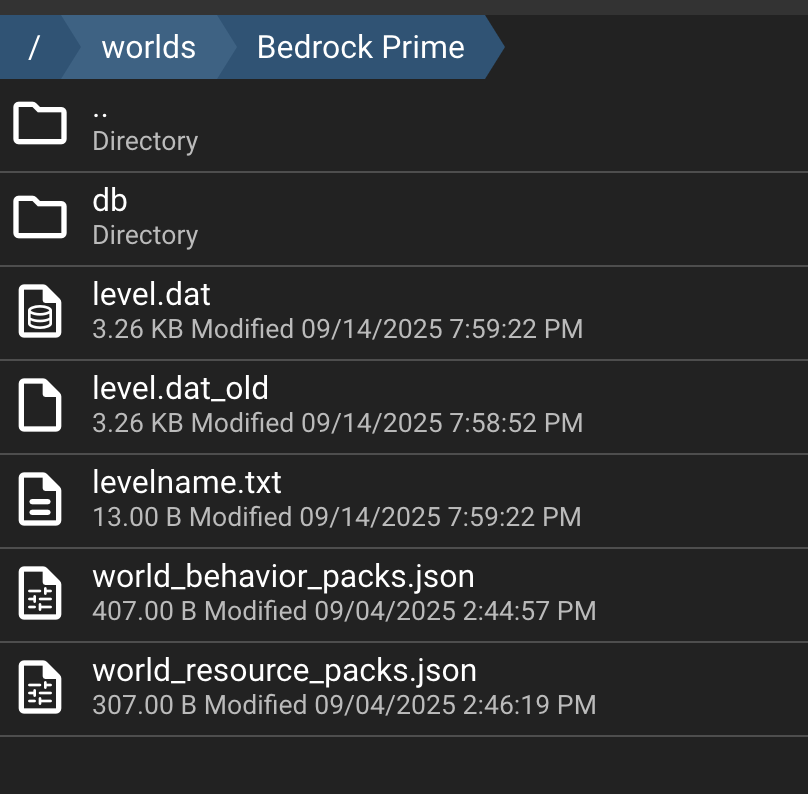
After following the above steps the instance recreates the Bedrock Level world folder, and ignores the Bedrock Prime world folder.
What is the correct process for importing an existing world in to an AMP instance?
Reproduction Steps
Copy server.properties file to the instance. World name is Bedrock Prime.
Copy Bedrock Prime folder from old server to AMP using file manager.
I uploaded my existing world into a folder within the worlds directory. At the moment I have the default “Bedrock level” folder that was created automatically when I spun up the server, plus the one that I uploaded (called “Bedrock Prime”).
I originally tried editing the server.properties file directly but this didn’t work.
Instead, within the “manage server” part of my server, where you have the menu on the left with Status, Console, Schedule, etc, I clicked “Configuration”
From there I chose the “Minecraft Bedrock” option.
I then changed both the Server Name and the Level Name fields to match the name of my uploaded world (“Bedrock Prime”) and restarted the server
The above options worked for me, but I was uploading a previously created world directory, rather than an mcworld file. I have the following in that directory, so you’ll need those (minus the two json files that I created to be able to use resource/behaviour packs on the server). If you don’t have those then perhaps open the mcworld in your local Minecraft and then find the relevant folder locally before uploading it.