I solved this on my own by disabling 2FA for the Steam’s phone app (see below for more information). I’ll post this to help anyone else out having the same issue. Devs if this is not intentional, please investigate this bug or reply to this thread that it is intentional to disable Steam 2FA.
OS Name/Version: Ubuntu Server 26.04
Product Name/Version: 2.8.0.4 - 20260724.1
Problem Description: How do I provide Steam 2FA information from Steam’s phone app to update an instance? I do not have a prompt to scan a QR code or to input a code for 2FA.
Steps to reproduce:
-
Step 1 Create a Left for Dead 2 instance
-
Step 2 Let the Left for Dead 2 instance update
-
Step 3 Input Steam login credentials
-
Step 4 Verify Steam login from the Steam App on my phone (this is where it asks for a QR code. I can also input a 2FA code as well, but there is no input field or QR code to scan. See screenshot below.)
-
Step 5 Let the prompt window for 2FA go away on its own (takes a minute)
Additional Screenshots
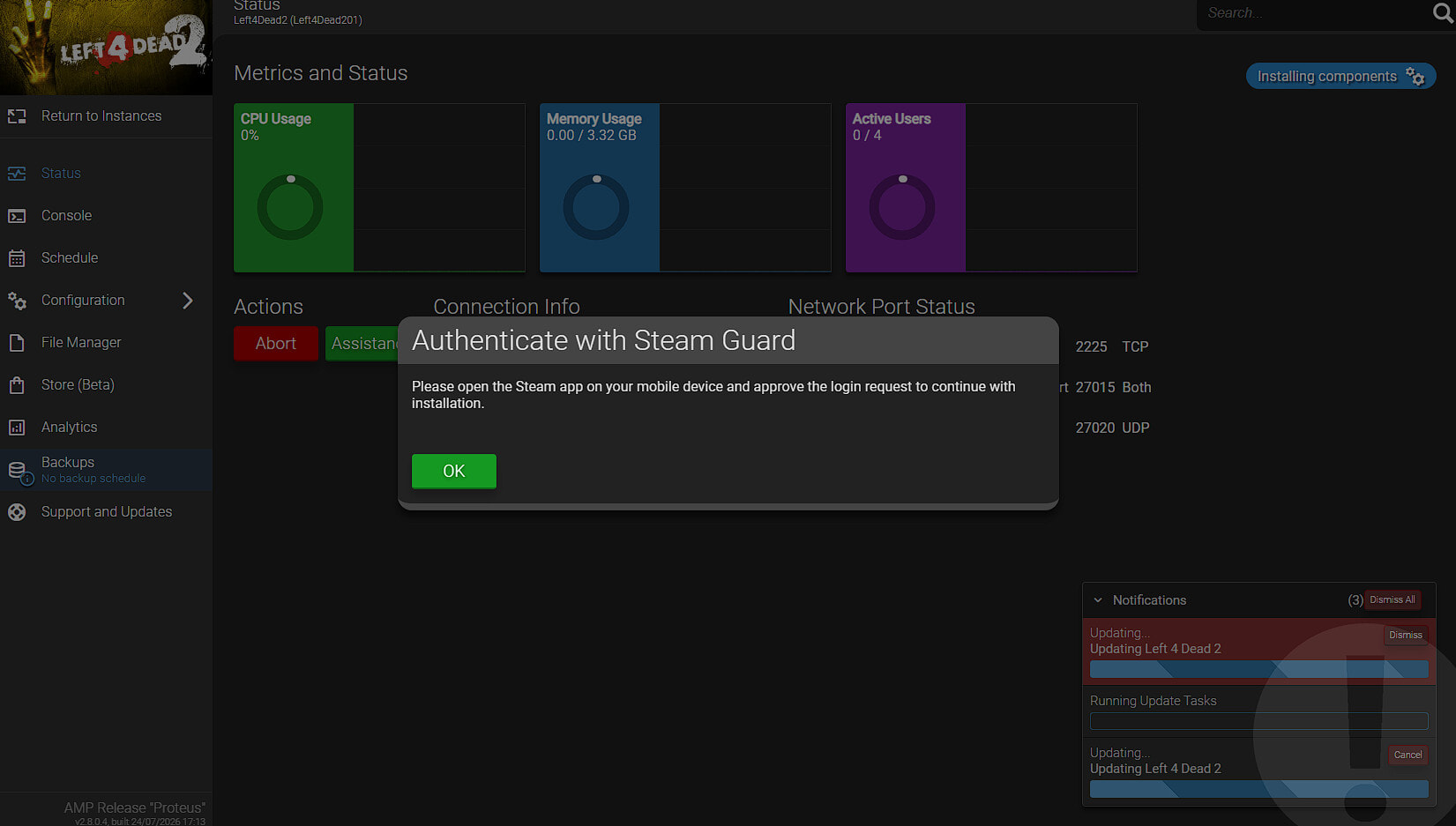
Console log:
```vbnet

Redirecting stderr to '/home/amp/Steam/logs/stderr.txt'

Logging directory: '/home/amp/Steam/logs'

[  0%] Checking for available updates...

[----] Verifying installation...

UpdateUI: skip show logo

Steam Console Client (c) Valve Corporation - version 1785186678

-- type 'quit' to exit --

Loading Steam API...OK

force_install_dir "222860"

Cached credentials not found.

password:

Proceeding with login using username/password.

Logging in user 'redactedUsername' [U:1:0] to Steam Public...This account is protected by a Steam Guard mobile authenticator.

Please confirm the login in the Steam Mobile app on your phone.

Waiting for confirmation...

Waiting for confirmation...

Waiting for confirmation...

Waiting for confirmation...

Waiting for confirmation...

Waiting for confirmation...

Waiting for confirmation...

Waiting for confirmation...

Waiting for confirmation...

Waiting for confirmation...

Waiting for confirmation...

Waiting for confirmation...Retrying...

Waiting for confirmation...

Wait for confirmation timed out.Timed out waiting for confirmation.

ERROR (Timeout)

app_update 222860 validate

ERROR! Failed to request app info update, not online or not logged in to Steam.

quit

Unloading Steam API...OK

Redirecting stderr to '/home/amp/Steam/logs/stderr.txt'

Logging directory: '/home/amp/Steam/logs'

[  0%] Checking for available updates...

[----] Verifying installation...

UpdateUI: skip show logo

Steam Console Client (c) Valve Corporation - version 1785186678

-- type 'quit' to exit --

Loading Steam API...OK

force_install_dir "222860"

Cached credentials not found.

password:

Proceeding with login using username/password.

Logging in user 'redactedUsername' [U:1:0] to Steam Public...This account is protected by a Steam Guard mobile authenticator.

Please confirm the login in the Steam Mobile app on your phone.

Waiting for confirmation...

Waiting for confirmation...

Waiting for confirmation...

Waiting for confirmation...

Waiting for confirmation...

Waiting for confirmation...

Waiting for confirmation...

Waiting for confirmation...

Waiting for confirmation...

Waiting for confirmation...

Waiting for confirmation...

Waiting for confirmation...

Waiting for confirmation...Retrying...

Waiting for confirmation...

Wait for confirmation timed out.Timed out waiting for confirmation.

ERROR (Timeout)

app_update 222860 validate

ERROR! Failed to request app info update, not online or not logged in to Steam.

quit

Unloading Steam API...OK

```
Actions taken to resolve so far: Only looked at other threads. I saw someone mentioning disabling 2FA on their account, but I would like to avoid this.
Steps to solve:
-
Disable Steam 2FA on the phone app
-
Update the instance again
-
You may get propted to to provide a different 2FA Steam guard code that was sent to your Steam’s email address
-
Instance will now update
Additional notes: I think you will only need to do this once for the instance. After this I assigned my instance a local IP and from there the instance updated without any issues.
My personal blurb: Not sure why 2FA on the Steam phone app is buggy. Devs who are reading this please investigate this issue. I know there is an option to give a 2FA code instead of scanning a QR code in the app, but we shouldn’t need to disable 2FA in order to hit the other prompt box.