Note - If you do not fill in every section below, your post won’t be answered - you must provide the steps you have followed so far and the actions you’ve already taken. Make sure to remove this notice from your post too.
OS Name/Version: Ubuntu Server 24.04
Product Name/Version: AMP Panel
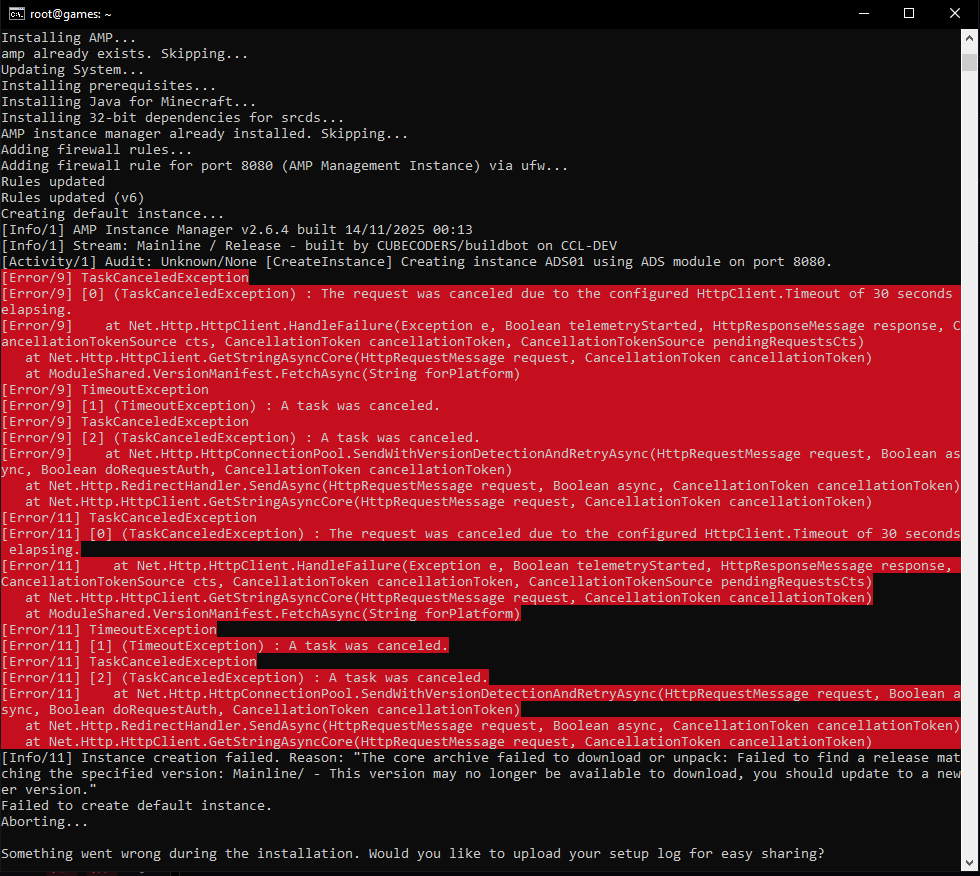
Problem Description: Hello after I entered the command bash <(curl -fsSL getamp.sh) and selected all the Installation steps, the Installation always fails because it is unable to create an Instance. Reason: The core archive failed to download or unpack. I will hand a screenshot of the command prompt
If you're sharing console output, logs, or commands you have run, please make sure to use code tags
(3x backticks for blocks, 1x backtick for a single line) to help make posts readable. This also
provides syntax highlighting.
Steps to reproduce:
- Step 1 ssh to your Ubuntu server and press sudo su -
- Step 2 enter bash <(curl -fsSL getamp.sh) and Install Java and Steam support
- Step 3 Press Enter to install AMP Panel and it will lead to the crash report for me
Actions taken to resolve so far: I tried to troubleshoot but I’m not realy sure were the problem lies. Could it be a DNS problem on my Server? I followed a youtube video and it worked fine for him.