OS Name/Version: Ubuntu Server 26 and Debian 13
Product Name/Version: Advanced Edition v2.8.0.8 - 20260927.1
Problem Description: Unable to manage servers if manually select the server with Controller/Target setup. Get an error saying “ADS failed to provide a login token.” I’m running AMP across 3 VMs in Proxmox (1 Debian LXC for the controller and 2 Ubuntu Server VMs). Logged in with super admin accounts trying this.
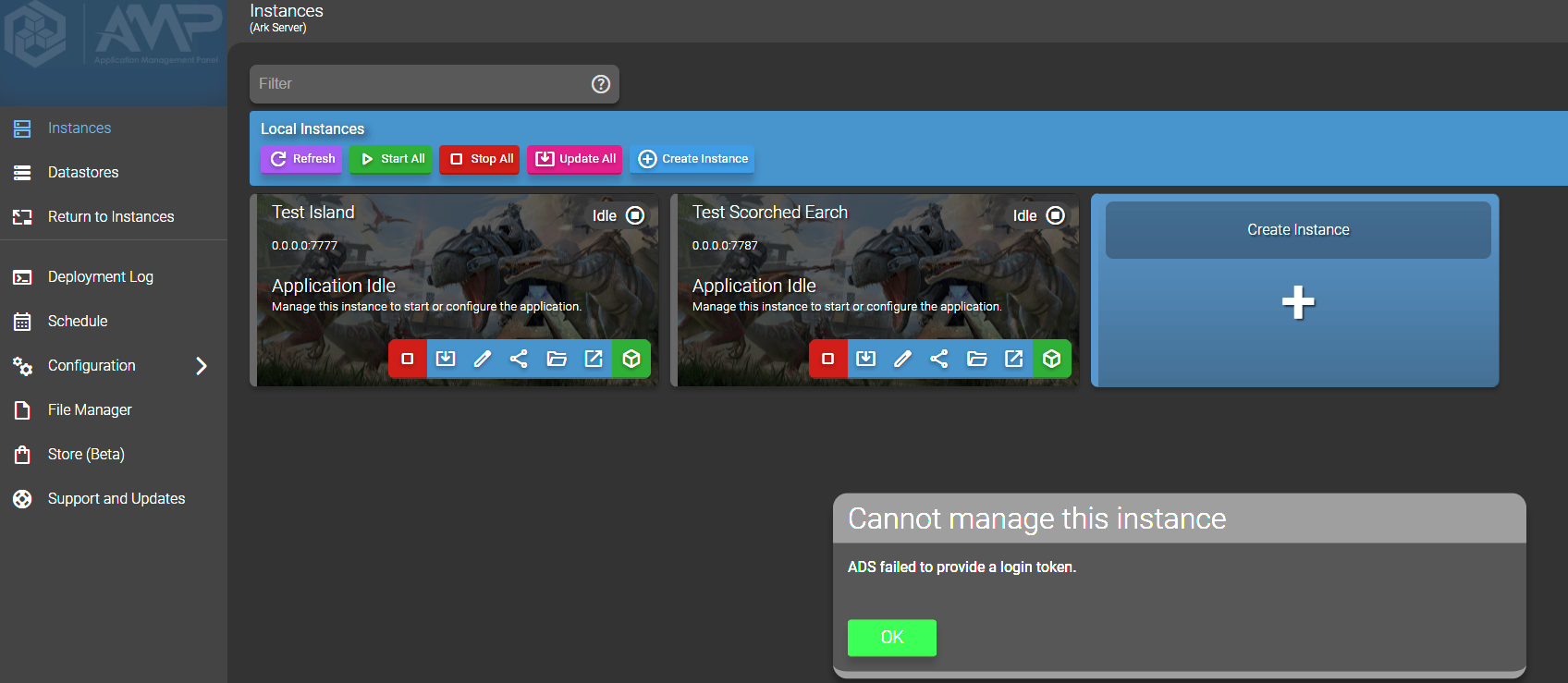
Steps to reproduce:
- Logging into AMP from CloudFlare Tunnel address/local IP or hostname and successfully authenticate via whatever method (local creds, OIDC, LDAP, etc.)
- Click the manage on the instance from the landing page = pass
- Click manage on the target server, then manage the instance from that page = fail
Actions taken to resolve so far:
Confirmed there are no firewall rules active between the VMs on the Proxmox host nor on the firewall to block traffic (using UFW on all 3 VMs/LXC). All 3 VMs/LXCs are on the same LAN with no blocks in communication setup between the hosts
First noticed the problem over Cloudflare tunnel. Tried locally to see if the issue persists and it does.