Connectivity Problem with Satisfactory - TLS / Certificate Error on Joining

System Information

Field Value
Operating System Windows - Windows 11 Pro on x86_64
Product AMP ‘Phobos’ v2.6.5.2 (Mainline)
Virtualization None
Application Satisfactory
Module GenericModule
Running in Container No
Current State Stopped

Problem Description

Issue

Both local and online users cannot join the server as it receives a certificate error and TLS error. Not sure what that means, can’t seem to figure it out.

Reproduction Steps

  • Created server with Template
  • Port forwarded all required ports
  • Gave public IP to friend, still using Default Port.
  • Errors on Join

Which ports have you forwarded? Needs both Game Port and Reliable Port

Did you use the server manager in-game first to create a world on the server?

I’ve port forwarded the Game port (7777) and Reliable Port (8888).
When I try joining the server with the server manager, I get a message saying “ The Remote host has presented a security certificate with an origin that cannot be marified. Please etc etc.”. I click confirm, then I receive this screen
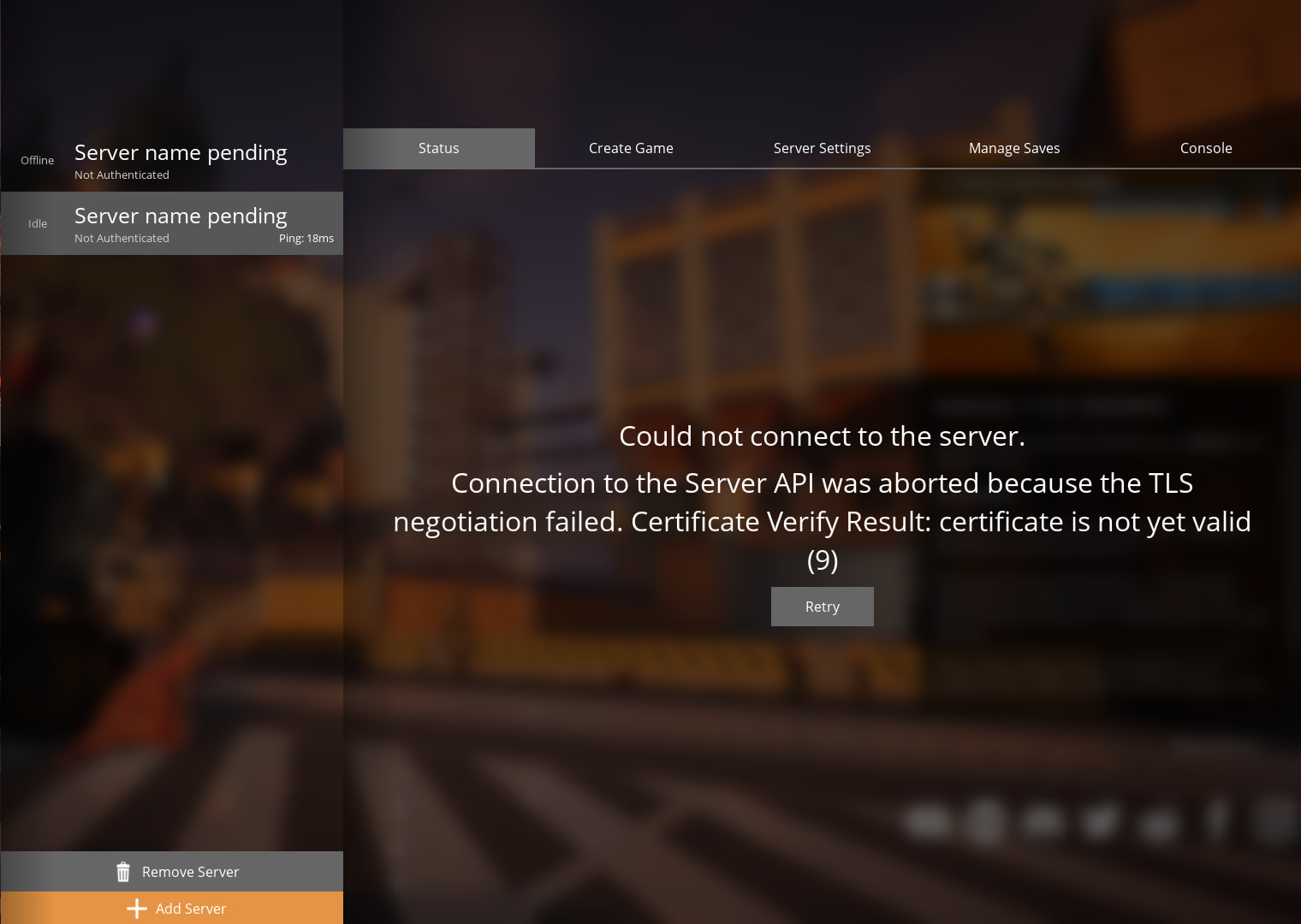
Right, but you answered whether you have created a game/world. See the Create Game tab

No, I added a Save I used from a previous play. I removed the save but still the same result.

This topic was automatically closed 30 days after the last reply. New replies are no longer allowed.