System Information
| Field | Value |
|---|---|
| Operating System | Linux - Debian GNU/Linux 12 on x86_64 |
| Product | AMP ‘Phobos’ v2.6.4.2 (Mainline) |
| Virtualization | None |
| Application | ARK: Survival Ascended |
| Module | GenericModule |
| Running in Container | No |
| Current State | Ready |
Problem Description
Issue
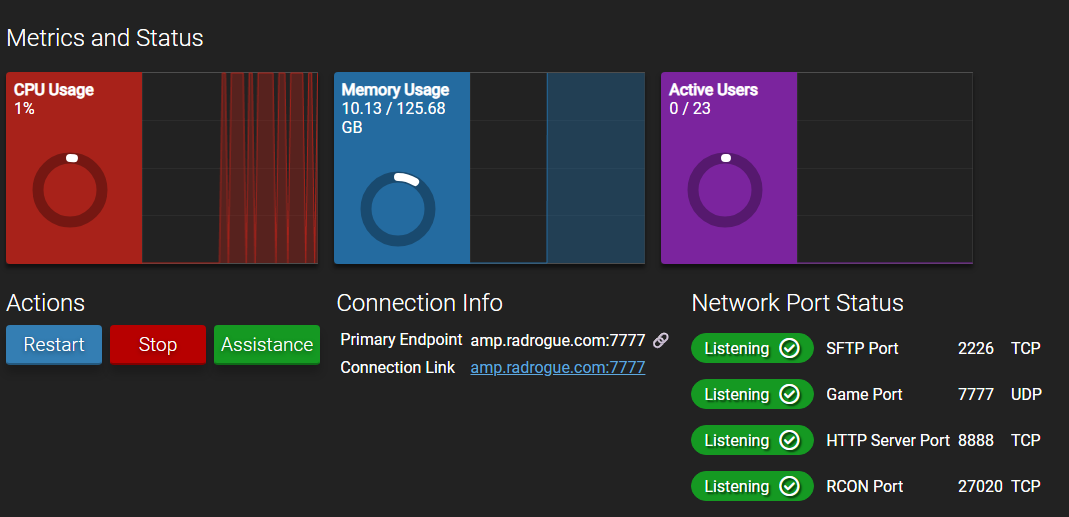
PS5 players are receiving time out messages when attempting to connect. Ports are open and listening on host, confirmed via external test. Logs show no incoming connection attempts at all.
Reproduction Steps
- Setup Instance
- Confirm Running Instance
- Monitor Logs while players connect
[log]
[2026.01.06-17.47.01:868][ 4]Server Initializing with BattlEye Anti-Cheat Protection. If you do not wish to use BattlEye, please launch with -NoBattlEye
[2026.01.06-17.47.01:874][ 4]BattlEye successfully started.
[2026.01.06-17.48.06:014][ 4]Attempted GC & Defrag: Start: 8.12 GB End: 8.10 GB 0.02 GB Free’d, Duration: 0.125354 seconds
[2026.01.06-17.48.06:014][ 4]Server: “The Burg” has successfully started!
[2026.01.06-17.48.06:074][ 4]Initializing Steam Subsystem for server validation.
[2026.01.06-17.48.06:078][ 4]Steam Subsystem initialized: Success
[2026.01.06-17.48.09:895][ 4]Attempted GC & Defrag: Start: 8.57 GB End: 8.50 GB 0.07 GB Free’d, Duration: 0.135919 seconds
[2026.01.06-17.48.09:895][ 4]Commandline: TheIsland_WP?listen?Port=7777?RCONEnabled=True?RCONServerGameLogBuffer=600?RCONPort=27020?DayCycleSpeedScale=1.000000?DayTimeSpeedScale=1.000000?NightTimeSpeedScale=1.000000?XPMultiplier=1.000000?PlayerCharacterFoodDrainMultiplier=1.000000?PlayerCharacterWaterDrainMultiplier=1.000000?PlayerCharacterHealthRecoveryMultiplier=1.000000?PlayerCharacterStaminaDrainMultiplier=1.000000?PlayerDamageMultiplier=1.000000?PlayerResistanceMultiplier=1.000000?DinoCharacterFoodDrainMultiplier=1.000000?DinoCharacterHealthRecoveryMultiplier=1.000000?DinoCharacterStaminaDrainMultiplier=1.000000?DinoDamageMultiplier=1.000000?DinoResistanceMultiplier=1.000000?StructureResistanceMultiplier=1.000000?HarvestAmountMultiplier=1.000000?HarvestHealthMultiplier=1.000000?ResourcesRespawnPeriodMultiplier=1.000000?TamingSpeedMultiplier=1.000000?ServerAdminPassword=ebba2026 -WinLiveMaxPlayers=70 -ServerPlatform=PC+PS5 -culture=en -servergamelog
[2026.01.06-17.48.09:895][ 4]Full Startup: 71.97 seconds
[2026.01.06-17.48.09:895][ 4]Number of cores 8
[2026.01.06-17.48.10:747][ 4]2026.01.06_17.48.10: Saving world…
[2026.01.06-17.48.10:761][ 4]2026.01.06_17.48.10: World Save Complete. Took: 0.774043
[2026.01.06-17.48.28:106][235]Attempted GC & Defrag: Start: 9.97 GB End: 9.95 GB 0.03 GB Free’d, Duration: 0.152133 seconds
[2026.01.06-17.48.28:106][235]Server has completed startup and is now advertising for join. (10.03GB Mem)
[2026.01.06-18.03.10:902][993]2026.01.06_18.03.10: Saving world…
[2026.01.06-18.03.10:916][993]2026.01.06_18.03.10: World Save Complete. Took: 0.928538
[log end]