OS Name/Version: Ubuntu Server 26.04 LTS
Product Name/Version: AMP Release “Deimos” v2.7.2.8, built 08/06/2026 00:16
Problem Description:
Have the following setup:
Internet → Firewall → NPM (Proxy) → AMP
NPM Rule is defined to work only internal so its mainly a problem between NPM and AMP.
When hitting the desired domain game.domain.lan NPM should switch to https://game.domain.lan and redirect internal to http://192.168.1.101:8080
but you always get 502 Bad Gateway Error.
AMP:
IP: 192.168.1.101
Port: 8080
AMP Webinterface is reachable under http://192.168.1.101:8080
NPM IP: 192.168.1.100
NPM Rue:
Domain: game.domain.lan (placeholder but will do)
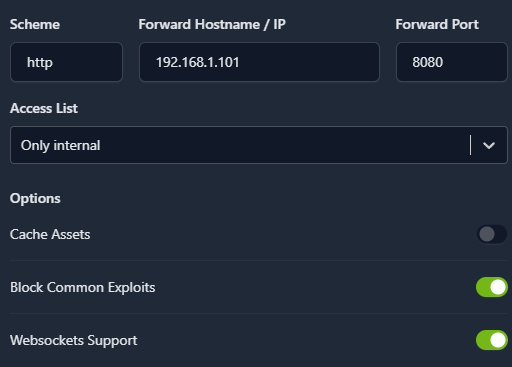
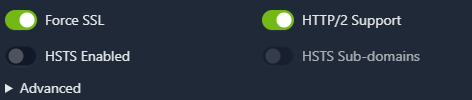
Certificate is valid and correct.
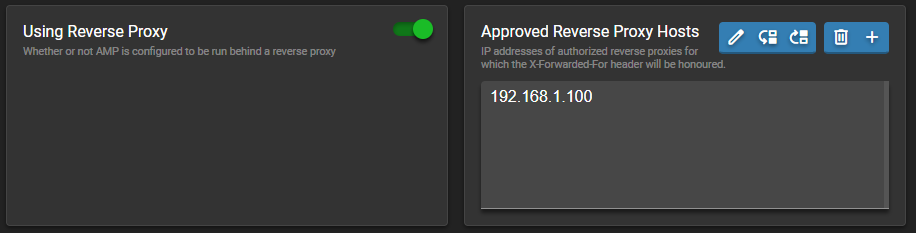
Inside AMP:
Actions taken to resolve so far:
Checked config file, its in there too.
Am i missing something?
Have other NPM Rules and Services where the same setup is working fine. Normally no hassle setting this up but now i`m struggleing. Had this running a few years without problems. Switched to new hardware and did setup basicly the same way.
Restarted, NPM, restarted AMP, checked DNS, checked ports, checks different Browsers, deleted Browsercache.. nothing works.
I remember when i first started with AMP and NPM a few years ago, i had similar problems, but do not remember the solution.
Steps to reproduce:
- Setup AMP
- Setup NPM (NginxProxyManager)
- Create NPM Rule to point to http NPM-IP Port 8080 with ForceSSL and WebsocketSupport minimum
- Activate NPM behind Proxy option
- Add NPM IP to Allowed ReverseProxy List