AMP 'Deimos' 2.7.2 Release Notes

The original release notes are located here:

Someone may have accidentally posted them in the wrong place causing AMP to not show the right link for release notes. That person will remain anonymous for their protection. :zipper_mouth_face:

AMP 2.7.2.2 ‘Deimos’

OIDC Improvements

One AMP install can now handle having local accounts and OIDC users on the same setup! Users can also be converted from/to Local or OIDC under the User Management tab.

Set Allow Local User Login in the UI to false or UseLocal in AMPConfig.conf if you’d like to keep the OIDC only login style where it auto redirects to the OIDC provider. Leave it true if you’d like to have local accounts alongside OIDC users. This is useful for having a local admin account that is disconnected from any OIDC systems.

OIDC state handling was improved to better mirror the standards in place by many providers.

Thanks to @sanegaming for working closely to test the changes and provide feedback!

Other Changes

  • Fixed Stores tab not showing the correct available stores
  • S3 uploads with no local backup no longer fail to upload
  • AMP no longer removes legacy themes until the new GitHub sourced themes are available
  • Fixed multiple instance cloning bugs
  • Discord webhooks avatar URL added
  • Removed deprecated ApplicationPort logic
  • Changed “Slow method invocation” message to debug log level
  • Fixed an issue accessing the Roles tab on remote instances when no roles exist
  • Address multiple issues with container instances start/stop logic
  • Text area inputs only save after clicking away from the input to match other settings behavior
  • Fix dictionary setting types (e.g. Default Settings) getting pushed wrong causing the UI to break for that setting until refresh
  • Logic added to automatically remove corrupted AMP downloads
  • Instance sorting A->Z uses the friendly (display) name
1 Like

AMP 2.7.2.4 ‘Deimos’

Websocket Improvements

We’ve implemented websocket communication between instances to allow for streaming data with minimal overhead. This allows new information to be pushed up the chain instantly rather than relying on HTTP polling requests at a set interval. The websocket is established once, then compatible traffic is pushed through it versus creating a new HTTP connection every request. This means less network bandwidth used and less computational overhead.

The main thing you’ll notice is the UI will receive updates more quickly on things like the Console or Deployment Logs tabs.

This opens the door to further improve on issues with controller/target setups where the UI has had issues getting notifications or instance changes. This already improves a lot of that, but there are more areas that need switched to the new method.

Keep an eye out for more improvements in future releases!

Other Changes

  • Additional websocket reconnect logic added
  • Removed GetUpdates API calls when websockets are functioning
  • Add re-authentication and API resend to the UI to address “session.exists” errors automatically
  • Hide the OIDC login button when not configured
  • Fix AMP shutdown logic not triggering a self-shutdown (Should address target linking issues)
  • The Update this instance button has been temporarily switched to a link to the update guide. This button doesn’t update the underlying tools or the generic templates as it needs to. We’ll be addressing it in a coming update once we tackle the security hurdles around it.
  • Generic instances can handle new ports being added to the template automatically - New ports may be assigned if none are available in the required ranges

AMP 2.7.2.6 ‘Deimos’

Minecraft. Dropdowns. Fixed.

The long standing bug of Java/Server version lists being set to the wrong value is solved. They are also sorted more cleanly. This should alleviate the issue of showing Java 25 when really Java 21 is selected, or having to hunt to find the version when they’re all out of order.

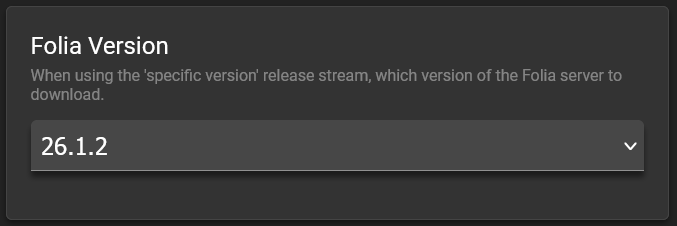
Folia version selection has been added along with a fix for log-strip-color errors for v26.

Setting Options

Default Settings and Template Provision Flags now display a pop-up with the available node settings. In a coming release, we’ll add Generic Template settings as well!

It shows the UI Category and Name of the setting with the setting node value underneath.

All Changes

  • Fixed Minecraft Java/Version drop-down settings displaying a different value than was set
  • Sorted the Minecraft version setting lists
  • Minecraft Folia version selector added
  • Minecraft Folia log-strip-color error fixed for v26+
  • Added --cpuset-cpus “CPU Set” container setting. Edit this through the pencil icon for an instance under the Container tab.
  • Default Settings and Template Provision Flags setting nodes pop-up added
  • Adjust Docker container options to reflect new tags created by Greelan
  • Websockets now correctly bind to IPv6 “::” address
  • Websockets function correctly when using “Direct from Controller” as the target access mode
  • Uptime and Port Status is correctly pushed through websockets
  • Scheduler tweaks to prevent doubling up of ticks when the server is under heavy prolonged load, delayed ticks will be dropped if they overlap the next tick (skips tasks rather than building up a backlog which could cascade the issue)
  • Add XDG_RUNTIME_DIR environment variable to processes handled by AMP
  • OIDC adjust role/group handling to follow standards more closely (Fixes Azure OIDC)
  • OIDC ensure nonce and JWT matches on returned call from provider
  • Added Generic Module ToolDiscovery setting type which can be used for things like finding versions of Java on a system
  • Added Generic Module RemoteOptionSource setting type to allow for gathering version numbers or other values from an API/web source
  • Add deletion confirmation pop-up when doing an instance migration and moved the deletion to the very last step

Patch 20260513.4

  • Fixed notifications popup showing under settings
  • Notifications are now collapsible
  • Adjust verbiage on instance cloning/migration licence type error to provide command to fix

Patch 20260513.8

Sorry for the issues as we pushed this hotfix. Something was either messing up on a CubeCoders server or Cloudflare causing lots of random things to fail. It looks all stable again though.

  • Fixed an issue with game servers not starting on Windows due to the new XDG_RUNTIME_DIR change intended for Linux only
1 Like

Patch 20260514.2

  • Fixed game server settings not displaying in the Configuration menu
  • Addressed potential null reference exception in task kill on Generic Module
  • Added unnamed port ranges to Generic templates- Needed for Dune Awakening which has undefined sets of ports it uses as needed

Known Issues:

  • Ports not displaying within the Status page on an instance - Clear your browser cache

AMP 2.7.2.8 ‘Deimos’

This is a special update with a few features that are primarily to support Dune Awakening specifically. However it includes some fixes to how containers are tracked that seriously improves behaviour when performing tasks such as changing ports or reconfiguring instances.

This makes AMP the only platform that provides true turnkey setup for Dune Awakening. No Hyper-V virtual machine, no Windows, no Alpine, no Kubernetes - just a simple, convenient, self-contained system on normal Linux systems (or Windows via Docker). It’s been a lot of work, but it has been worth it!

New Features

Port Range Definitions - the port listings for applications now support ranges for games that require contiguous blocks of ports. For example you can have 7777 to 7787 in a single block for a game that requires 10 sequential ports without requiring separate definitions for each individual port.

Resource Usage Information - When creating an instance, template authors can now include an additional note to warn you if a server has particularly high resource requirements such as requiring unusually large amounts of RAM.

Docker / Podman Event Stream - AMP now subscribes to the event streams for the container platform in use, which solves a lot of problems with AMP thinking an instance is running when it’s not and vice-versa and the stalling that would happen when an instance was reconfigured or had it’s ports changed.

Fixes

Addresses ports not correctly showing up in the monitoring section within an instance (along with the primary endpoint) after either being changed in the instances Ports section or when an update to an instances base template configuration requires port reallocation.

Patch 20260520.1

  • Revert Docker / Podman event streaming - Caused instances to lose tracking and high resource usage on Podman
  • Address S3 backups being enabled, but not configured causing a crash and Backups tab to disappear

Patch 20260608.1

No need to update. This has no changes and is only being released to address a build server issue.

AMP 2.7.2.10 ‘Deimos’

:warning::warning::warning:These notes are for an unreleased version of AMP​:warning::warning::warning:

In case you missed the recent announcement about the feature freeze:
https://discourse.cubecoders.com/t/the-future-of-cubecoders-and-amp-feature-freeze/40387

We’ve created a bug tracker on GitHub to keep tabs on the progress being made. If there’s a bug not listed, please be sure to create an issue in the AMP repo so we can properly address it:
https://github.com/orgs/CubeCoders/projects/4

This is the first bug fix only release since the announcement.

Backups

We’ve reviewed how AMP handles backups compared to industry standards and identified fundamental flaws that needed addressed. We had to change the process to account for all scenarios that come up with game servers and applications. Here is the updated process so you can be prepared to make adjustments on your existing backups:

To avoid unexpected shutdowns for people who update without reading release notes, we are NOT retroactively applying these changes to existing scheduler tasks. This means existing backups may still cause corruption and should be recreated to follow the new logic.

Some applications support “quiesce” where we can send a command to tell the application “Don’t save anything else to the disk until we say otherwise.” The game continues to function in memory only until we give the okay to continue saving to disk. This is great because we can do what we need with the existing files with guarantees the application won’t be editing or adding files while we work. Minecraft and Minecraft Bedrock are the two apps that support this currently.

Applications that don’t support a quiesce must be shutdown to take a backup. This is the only feasible way to ensure the backup won’t be corrupted by the application fighting for access. We want to minimize downtime, so we came up with some methods to address this.

In all scenarios below, AMP will perform the steps and then start the application while continuing the compression of the staged files in the background.

On Linux:
If the AMP instance is on the same filesystem as the Backups folder, it will make a hardlink to a staging directory which is almost instant. Any changes to the files after this are tracked by the OS and do not impact the linked files.

If the AMP instance is on a different filesystem as the Backups folder, AMP will clone the files to the staging directory which is fast but may take a few seconds to a minute depending on the size and file count. This requires double the space during the backup only.

On Windows:
AMP will clone the files to the staging directory which is fast but may take a few seconds to a minute depending on the size and file count. This requires double the space during the backup only.

We’ve attempted to minimize any surprises by adding warnings in the scheduler and backups sections.

The backup task that includes a shutdown has been combined into the main task as a toggle, as seen in the screenshot above.

  • Display backup errors in pop up messages
  • Don’t fail the full backup due to file being inaccessible/not existing
  • Hide the “No Backup Schedule” notice on the Backups tab if user doesn’t have Scheduler permissions
  • Default “Use Smart Backup Exclusions” to on for new instances
  • Files re-indexed after quiesce to account for final changes by the application
  • Minecraft waits for “Saved the game” or timeout before continuing backup
  • Generic Module quiesce delay moved from 5ms to 5000ms (5 seconds)
  • Replaced per directory .backupExclude and .autoExclude with instance directory backupExclusions.conf and backupExclusionsAuto.conf to fix incompatibility with some game servers - File exclusion status shows in File Manager per file

Scheduler Changes

  • Variables error when no input selected or unsupported input type selected when a variable is clicked to add
  • Tasks are hidden that aren’t supported by the application (Check for Steam updates on non-Steam apps/Do something when last player leaves but no player tracking) - Existing schedules are not impacted, but will continue to work with the flawed logic
  • Default scheduled triggers that are automatically added in a new instance are based on the above logic as well
  • Prevent firing triggers that are disabled after startup
  • Fix the “x” button not closing the popup
  • Event triggers queue rather than silently dropping when multiple fire of the same type at once - Timed triggers will continue to be dropped to avoid accumulating the issue caused by long running tasks

Minecraft Changes

  • Allow empty setting values rather than reverting to defaults
  • Incorrect Java Version logic updated to properly change to the correct version when a wrong one is selected on startup. Added support for multiple modloaders
  • Fix Folia TPS monitoring
  • If “Specific Jar” is selected, reset it to Automatic when a new ModLoader or Version are selected
  • Fix for sleep on start where the server wouldn’t sleep after waking update
  • Velocity should select the latest non-SNAPSHOT release on Stable
  • Sleep mode now presents the proper server icon and text in grayscale rather than default icon and not formatted
  • Sleep mode wake up message support for languages that don’t use the Latin Alphabet
  • Switched Betacraft to handle alpha/beta/classic versions due to not being available from Mojang (IPv4 only due to DNS issues with their site)
  • Fix startup monitoring and arguments for many alpha/beta/classic versions
  • Adjust user join/leave tracking to handle [Something]PlayerName: format that certain mods use

ampinstmgr Changes

  • ampinstmgr upgradeall skips Docker image updates and marks all instances for update prior to restarting ADS - Fixes some instances not getting updated randomly
  • ampinstmgr validateInstance fixes for version checks and release streams
  • ampinstmgr reconfigure no longer deactivates an instance or resets settings (e.g. OIDC getting disabled)

getamp Changes

  • Add Docker dependency to prevent hard shutdown on Docker updates (obtain by running getamp update on existing installs)
  • PhotonOS fixes courtesy of rtfmoz2
  • Prerequisite package install ordering courtesy of rtfmoz2
  • Remove tput as a hard requirement

Further Fixes

  • Generic templates that only track on UserId/SessionId (as opposed to Username) now detects subsequent users
  • First time setup tutorial no longer recommends managing a new instance from a target
  • Podman instances with mounts in read only mode failed to start due to incorrect syntax
  • Starting instances on boot will continue starting instances after one fails instead of stopping the entire startup sequence
  • Add a check for network status on container instances to avoid starting AMP before the network stack is fully loaded

Known Issues

  • Existing backup tasks are removed erroneously